ZGo Payment Processor: Ịnabata Zcash na-enweghị Nchebe
ZGo is a non-custodial payment processor for Zcash. A customer pays in ZEC from their own wallet, ZGo monitors the Zcash blockchain for the transaction, and the funds arrive directly in the merchant's wallet through a shielded transfer. ZGo never holds the money in between.
This guide explains how the payment flow works, how to set up an account, and how to integrate ZGo with Xero and WooCommerce. It also covers the two mistakes that cause most first-time setup problems.
Na peeji a
- Gịnị mere iji ZGo
- Otú ZGo si arụ ọrụ
- Ịmepe akaụntụ
- ZGo na Xero
- ZGo na WooCommerce
- Ihe ndị e ji mara
- Mmehie ndị a na-emekarị
- Nkwubi okwu
- Ebe e si enweta ego
Ihe mere ị ga-eji jiri ZGo
Most cryptocurrency payment processors are custodial. Funds first land in the processor's account and are forwarded to the merchant later, which means a third party temporarily controls the money and can freeze, delay, or report on it.
ZGo takes the opposite approach. Payments move from the customer's wallet directly to the merchant's wallet through a Zcash shielded transaction. The processor only generates the invoice and watches the blockchain for confirmation. There is no intermediary balance, no withdrawal flow, and no third party that can hold up settlement.
For a merchant, this means three practical things: full custody of incoming ZEC, shielded transaction privacy by default, and no dependency on a centralized provider staying online or solvent.
Otú ZGo si arụ ọrụ
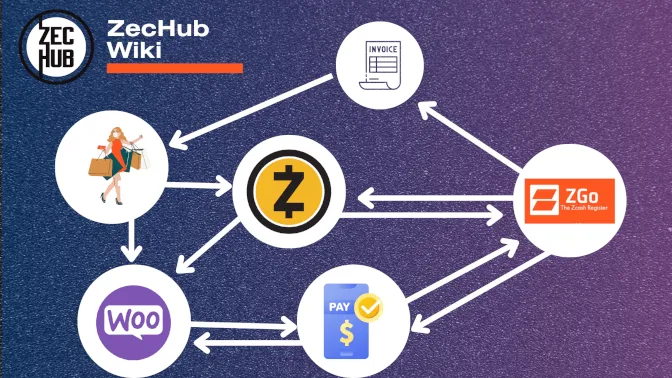
Usoro ịkwụ ụgwọ bụ otu ihe ahụ n'agbanyeghị ma ZGo na-eji standalone, site na Xero, ma ọ bụ site na WooCommerce:
- The merchant generates a payment request in ZGo, which renders as a QR code with the amount, the invoice ID, and a Zcash receiving address.
- The customer scans the QR with a Zcash wallet (Orchard, Sapling, and Transparent address types are all supported on the WordPress plugin) and approves the payment.
- The transaction is broadcast to the Zcash network as a shielded transfer from the customer's wallet to the merchant's wallet.
- ZGo na-enyocha Zcash blockchain maka azụmahịa ahụ.
- Mgbe nkwenye ise gachara, ZGo na-egosi ịkwụ ụgwọ ahụ dị ka nke ikpeazụ ma na-agwa njikọ ọ bụla jikọtara (Xero, WooCommerce, ma ọ bụ webhook).
Nkwado nkwenye ise bụ nọmba isi. Ihe ọ bụla dị n'ihu bụ ịkwụ ụgwọ na-aga n'iru, ọ bụghị ụgwọ a natara. Mmezu nke iwu, mmelite ngwaahịa, na ihe ọ bụla na-enweghị ike ịgbanwe agbanwe n'akụkụ onye ahịa kwesịrị ichere maka nzọụkwụ 5.
ZGo runs in any modern browser on desktop or mobile, with no install on either side. The customer needs a Zcash wallet; the merchant needs a Zcash wallet and a ZGo account.
Ịmepụta akaụntụ
To create a ZGo account, a Zcash wallet with a small amount of ZEC is required. The small ZEC balance covers the on-chain fee for the account-initialization transaction. Any major Zcash wallet works for this; see ZecHub Wallets maka nhọrọ ndị dị ugbu a.
Ntọala ntọala:
- Mepee zgo.cash na ihe nchọgharị.
- Mepụta akaụntụ site na iji obere akpa Zcash n'okpuru njikwa onye ahịa. obere akpa a ga-ejide igodo. adreesị nkwụnye ego mgbanwe agaghị arụ ọrụ (lee Ihe ndị a na-emekarị).
- Nyochaa obere akpa ahụ site na izipu obere azụmahịa mmalite.
- Hazie adreesị nnata. Ịkwụ ụgwọ niile a na-eme site na akaụntụ a ga-adaba na obere akpa a.
Once the account is active, the same merchant can use ZGo for one-off payments (a single QR code at a pop-up event) or wire it into a permanent setup through Xero or WooCommerce.
ZGo na Xero
Xero is a cloud accounting platform used by many small and mid-size businesses. The ZGo–Xero integration lets a merchant issue an invoice in Xero, have the customer pay it in ZEC, and have Xero automatically mark the invoice as paid once the transaction confirms.
Otú o si arụ ọrụ:
- Onye ahịa ahụ na-emepụta akwụkwọ ọnụahịa na Xero dị ka ọ dị na mbụ.
- ZGo na-agbakwunye nhọrọ ịkwụ ụgwọ Zcash na akwụkwọ ọnụahịa ahụ.
- Onye ahịa na-akwụ ụgwọ na ZEC site na obere akpa ha.
- ZGo na-enyocha Zcash blockchain maka azụmahịa ahụ.
- Mgbe nkwenye ise gasịrị, ZGo na-akọghachi ụgwọ ahụ na Xero, nke na-egosi akwụkwọ ọnụahịa ahụ dị ka akwụ ụgwọ.
The ZEC lands in the merchant's wallet, not in any ZGo-controlled or Xero-controlled account. The accounting record in Xero stays in sync with the on-chain settlement automatically.
Maka oge mbụ ịtọlite, soro usoro ije ije a raara nye: Xero Integration Configuration.
ZGo na WooCommerce
Maka ụlọ ahịa dị n'ịntanetị na-agba ọsọ na WooCommerce na WordPress, ZGo provides a dedicated plugin. The plugin adds Zcash as a payment method at checkout and handles the order state automatically when the payment confirms.
Ọgwụgwụ-na-ọgwụgwụ na-aga n'ime ụlọ ahịa WooCommerce:
- Onye ahịa ahụ na-eru ego ma họrọ Zcash dị ka usoro ịkwụ ụgwọ.
- Ihe mgbakwunye ahụ na-ewepụta arịrịọ ịkwụ ụgwọ ma gosipụta koodu QR na ibe ndenye ọpụpụ.
- Onye ahịa ahụ na-akwụ ụgwọ site n'akpa ego ya.
- The transaction broadcasts to the Zcash network and ZGo begins monitoring it.
- Mgbe nkwenye ise gasịrị, ZGo na-akọ ụgwọ ahụ dị ka nke ikpeazụ na ngwa mgbakwunye.
- Ihe mgbakwunye ahụ na-egosi iwu WooCommerce dị ka akwụ ụgwọ ma melite nchekwa data iwu.
The order is only paid when step 6 completes. Earlier states (broadcast, first confirmations) can be shown to the customer as "payment received, awaiting confirmation," but inventory, fulfilment, and any downstream automation should wait for the final state.
The plugin also installs an administrative dashboard inside WordPress, where the merchant can monitor orders and incoming ZEC payments alongside the normal WooCommerce order view. The plugin supports all current Zcash address types: Orchard, Sapling, and Transparent. Customers paying from any compliant wallet can complete the transaction.
Njirimara
Non-custodial. Payments move directly from the customer's wallet to the merchant's wallet through shielded transactions. ZGo never holds the funds in between, and the merchant retains full control throughout.
** Ntinye mgbanwe.** Enwere ike iji ZGo mee ihe maka otu ehihie n'ahịa ahịa, maka nhazi nke ire ere, ma ọ bụ dị ka ndabere maka ụlọ ahịa dị n'ịntanetị site na Xero maọbụ WooCommerce integrations.
Browser-based. No install on either the customer or the merchant side. ZGo runs in any modern browser on desktop or mobile.
** Ngwakọta akpa ego.** Nnukwu akpa ego Zcash, gụnyere ndị na-akwado ụdị adreesị Orchard, Sapling, na Transparent, nwere ike ịkwụ ụgwọ akwụkwọ ọnụahịa ZGo na-enweghị nhazi ọzọ n'akụkụ onye ahịa.
Integrations. Direct integrations with Xero (accounting) and WooCommerce (e-commerce) cover the two most common merchant workflows out of the box.
Mmehie ndị a na-emekarị
Treating the order as paid before five confirmations. A broadcast transaction is not the same as a confirmed payment. The transaction can still fail to confirm or be replaced. Only after five confirmations does ZGo report the payment as final, and only then should the order be marked paid downstream. If a merchant configures inventory or fulfilment to trigger on the broadcast event, fraudulent or failed payments will cause real losses.
Pointing ZGo at an exchange deposit address. It looks like a Zcash address, but exchange deposit addresses are controlled by the exchange, not the merchant. The exchange holds the keys, which means the exchange holds the funds, which defeats the reason for using a non-custodial processor. The wallet address configured in ZGo must be a wallet whose seed phrase the merchant controls directly.
Treating ZGo as a wallet. ZGo is a payment processor, not a wallet. It does not store keys, hold balances, or let the merchant spend funds. A separate Zcash wallet under the merchant's control is required to receive the money that ZGo routes.
Mmechi
ZGo gives merchants a way to accept Zcash payments without giving up custody, without depending on an intermediary, and without exposing transaction details on a public chain. The two integrations (Xero and WooCommerce) cover the most common merchant workflows; for everything else, ZGo can be used standalone from any browser.
Maka nhazi, ụzọ dị mkpirikpi: nweta obere akpa Zcash, mepụta akaụntụ na zgo.cash, ma malite ịmepụta arịrịọ ịkwụ ụgwọ ozugbo ma ọ bụ wụnye njikọta dị mkpa.
Akụnụba