Got ZEC on Solana? Move it to shielded Zcash
This page is for you if ZEC showed up in your Solana wallet because you hold ZCAT, or another Solana token that pays its holders in ZEC. You don't need to sell anything to follow it. You'll move the ZEC you already have from Solana to a Zcash wallet and end up with it shielded.
We ran every step below with a real transfer on 27 September 2026, starting with 0.00266336 ZEC in Phantom. The fees, times and screens on this page are what we saw.
TL;DR
- ZEC in your Solana wallet is a Solana token (mint
A7bd…QXaS) backed 1:1 by real ZEC that the NEAR OmniBridge holds on the Zcash chain — "paper ZEC" that lives on Solana's public ledger and can't be shielded there.
- The route is two steps: deposit the token on solswap.org (NEAR Intents), then withdraw on near.com to your wallet's shielded
u1 address. Don't use Phantom's own Swap button — it can't help you.
- Use a wallet the ZecHub directory marks Ironwood: Ready, and keep a little SOL in Phantom for the Solana fee.
- Our real test (27 September 2026, 0.00266336 ZEC): deposit landed in 9 seconds, withdrawal took about 8 minutes, total cost ~0.00025 ZEC + 0.0016 SOL.
- Safety line: only sign message requests on
near.com/solswap.org with intents.near in the message, never type your seed phrase, and paste a u1, never a t1.
Visual analogy
ZEC on Solana works like a casino chip. It prices like cash, and the casino — the NEAR OmniBridge — promises real banknotes (native ZEC) to anyone who returns the chip. But the chip is just a row in the casino's ledger: everyone can see who holds it, and its value depends on the casino's systems staying sound. Withdrawing through near.com is walking to the cage and cashing the chip. Once the banknotes are in a shielded pool, they're in your own opaque wallet — nobody can see the amount or the holder anymore.
What you actually hold
The ZEC in your Solana wallet is a token on Solana, not coins on the Zcash network. The NEAR OmniBridge issues it and holds real ZEC on the Zcash chain to back it; the bridge has been live on Solana since October 2025. Its Solana leg runs on Wormhole messages and NEAR Chain Signatures, not on a Zcash light client, so the Solana side is only as sound as those two systems. People call it "paper ZEC". It tracks the price of ZEC, but every balance and every transfer sits on Solana's public ledger under your wallet address, and it can't be shielded while it stays there.
Check that yours is the real token. In Phantom, tap ZEC and scroll to About Zcash. The contract address must be:
Code-highlight
A7bdiYdS5GjqGFtxf17ppRHtDKPkkRqbKtR27dxvQXaS
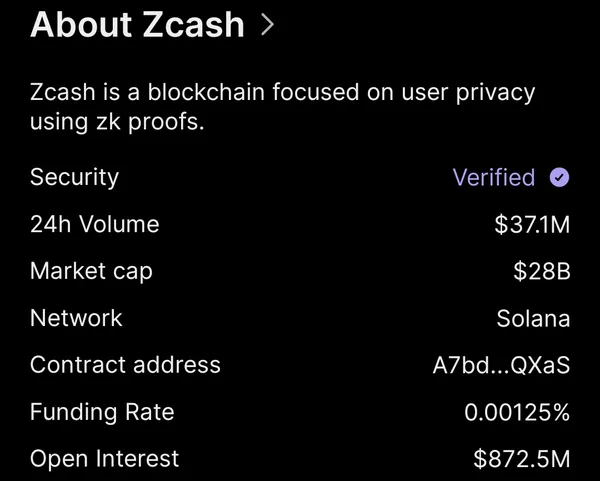
Phantom shortens it to A7bd…QXaS, so compare the first and last characters, or look the full address up on Solscan. Any other "ZEC" token in your wallet, whatever its name or logo, isn't this one. Leave it alone.
Why move it
Shielded ZEC is the point of Zcash. When your ZEC sits in a shielded pool, the sender, the receiver and the amount of each payment are encrypted on the Zcash chain. Nobody browsing an explorer can see your balance.
You already hold ZEC. Moving it into a Zcash wallet gets you the part that makes it Zcash, and it takes the bridge out of the picture: native ZEC in your own wallet doesn't depend on anyone honouring a redemption.
Who can see your Zcash payment? explains exactly what stays hidden.
Pick a Zcash wallet
ZecHub doesn't pick one for you. Choose from the ZecHub wallet directory, and check two labels on the wallet's card before you install it:
- Ironwood: Ready. Ironwood is the pool new shielded ZEC goes into since the Ironwood upgrade on 28 July 2026. The older Orchard pool no longer accepts new funds.
- Automatic Shielding. Useful if a payment lands transparent: the wallet moves that ZEC into the shielded pool for you. Do not treat this label as a substitute for Ironwood: Ready. A wallet can have Automatic Shielding and still lack an Ironwood pool (Edge is in that state on the directory today). Most other wallets show a Shield button instead.
Install the wallet from the link on its directory card, not from a search result or an ad. Write the seed phrase on paper and keep it offline.
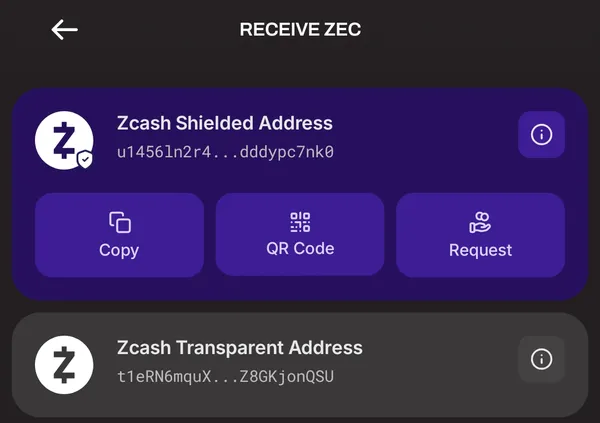
Your wallet shows two kinds of address:
| Starts with | Type | What the public sees |
|---|
u1 | Unified Address | Nothing about you, but only when the payment lands in a shielded pool |
t1 | Transparent address | Your address and the amount, forever, like on Solana |
Use a u1 that your wallet labels as shielded. A u1 is a bundle of receivers, and some wallets put a transparent receiver in it next to the shielded one. A sender that can only pay transparent addresses will use that one, and your payment lands public even though you pasted a u1. Our test wallet's shielded address has no transparent receiver, so that couldn't happen. Shielded pools covers receivers in more detail. Some wallets show a new u1 every time you open Receive; that's normal, and they all belong to you. The receive screenshot and the near.com recipient field on this page use different u1 prefixes for that reason.
We used ZODL for our test because it was the wallet we had set up. Only wallets the directory marks Ironwood: Ready can receive new shielded value.
Move it
The route has two parts: put your ZEC into NEAR Intents from Phantom, then send it out to your Zcash address. We used solswap.org, a NEAR-built site for Solana users, for the first part and near.com, NEAR's own app, for the second. ZecHub's How to swap for ZEC in Phantom Wallet guide covers solswap's screens in more detail. Don't use Phantom's own Swap button for this: you already hold the token, and swapping it gets you nowhere.
Keep a little SOL in Phantom for the Solana fee.
1. Deposit your ZEC on solswap.org
- Open Phantom, go to the browser tab, type
solswap.org yourself and connect your wallet.
- Tap Deposit. Set Asset to Zcash, Network to Solana and the method to Wallet.
- Enter the amount (or tap Max) and approve the transaction in Phantom.
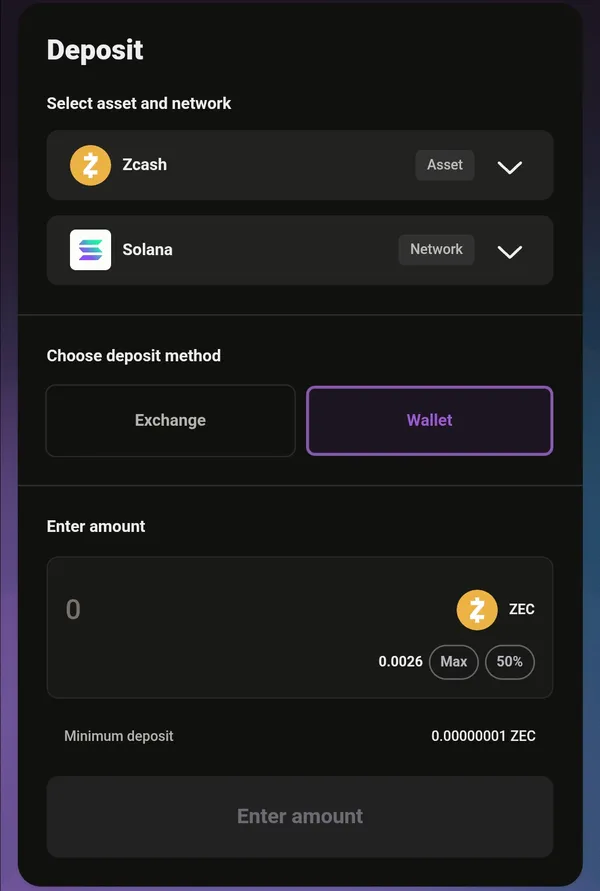
Our deposit landed in the Solana block at 15:09:08 (UTC+1) and solswap showed it as Completed nine seconds later.
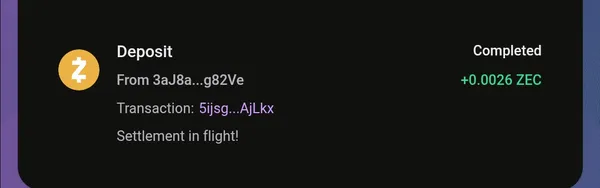
Your ZEC now sits in your NEAR Intents balance. Your Phantom key authorizes every move out of it, NEAR Intents solvers carry out the delivery, and NEAR Intents can hold a balance for compliance review (see the trust notes below).
2. Send it to your Zcash address on near.com
solswap has a Withdraw page too, but it didn't work for us. The Received amount and Fee stayed at "–" and the button did nothing, whether we picked Zcash or Solana as the network.
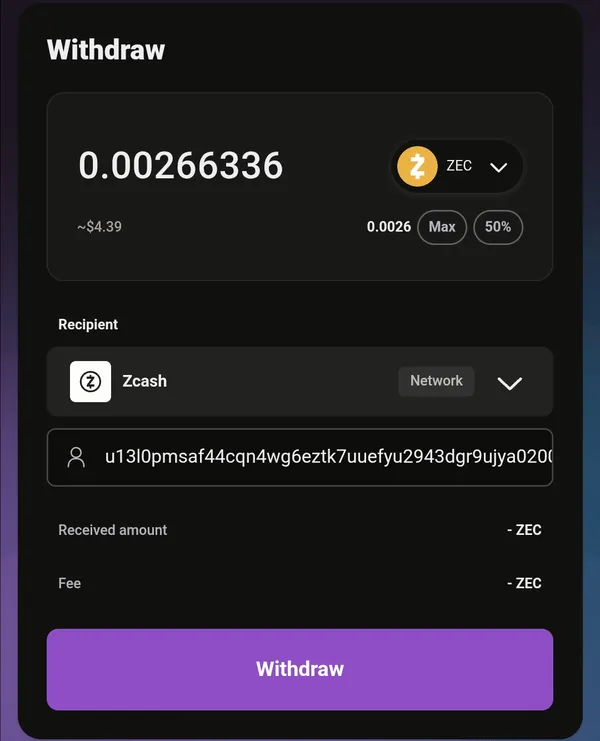
If that happens to you, your ZEC isn't stuck. The balance is tied to your wallet's key, not to the website, so any NEAR Intents app you sign in to with that wallet can reach it. We finished on near.com:
- Go to
near.com and sign in with the same Phantom wallet.
- Your solswap balance appears under Move legacy assets (near.com calls balances from older NEAR Intents apps "legacy"). Tap Withdraw on the ZEC row. You don't need Move.
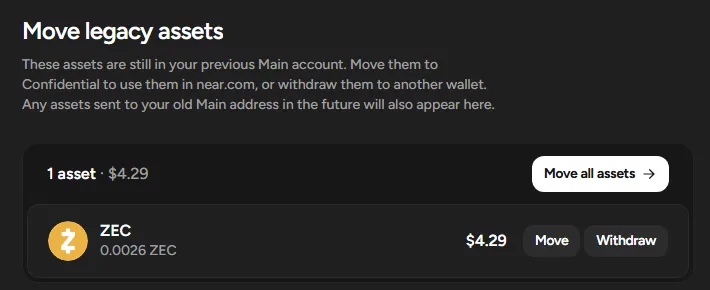
- Set Network to Zcash, paste your wallet's
u1 address as the Recipient and check the first and last six characters against your wallet.
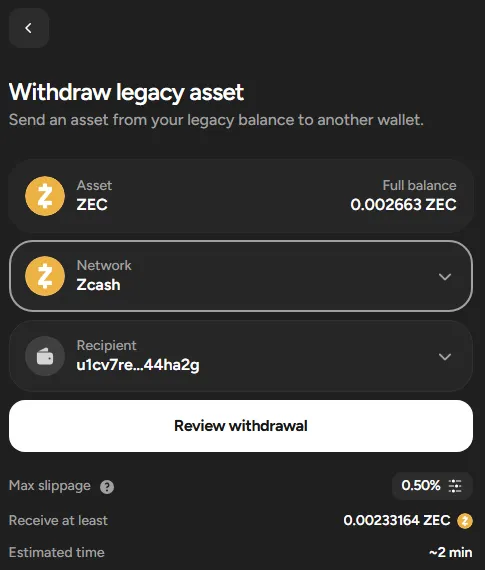
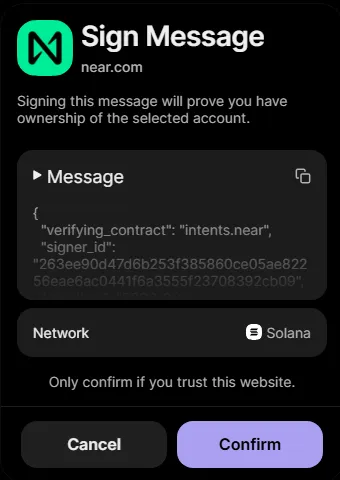
- Tap Review withdrawal, read the summary and tap Send.
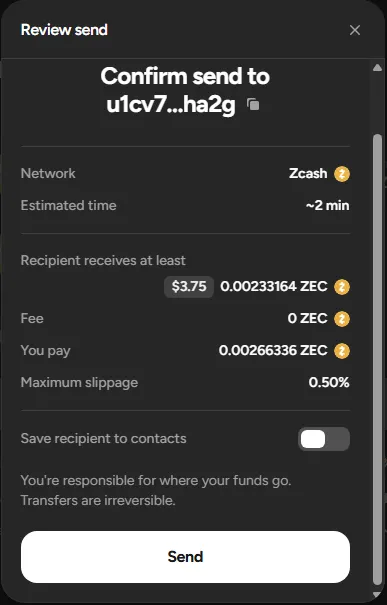
- Phantom asks you to Sign Message for near.com. This signature is what authorizes NEAR Intents to move your balance. It costs no SOL, but that doesn't make it harmless: a look-alike site can show the same request and empty your NEAR Intents balance with it. Before you tap Confirm, check all of these, and tap Cancel if any one fails:
- The site named on the request is
near.com. (The deposit in step 1 was an ordinary Phantom transaction request from solswap.org; check that name there the same way.)
- Open Message and find
"verifying_contract": "intents.near".
- The message is readable text like the screenshot. If it's an unreadable blob, or the site doesn't match the one in your address bar, reject it.
- It never asks for your seed phrase. Signing never involves typing it.
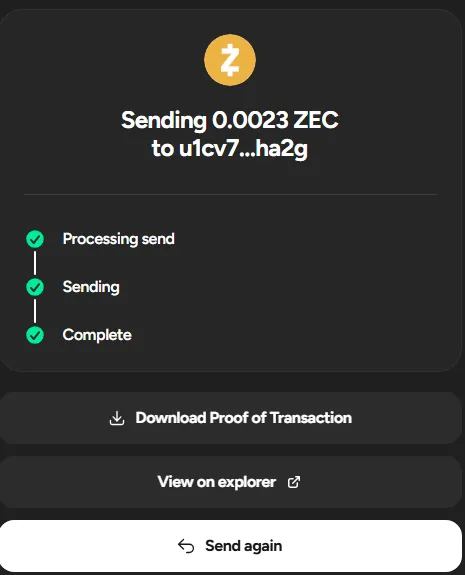
- near.com shows Processing send, Sending and Complete. View on explorer opens the NEAR Intents record of the transfer.
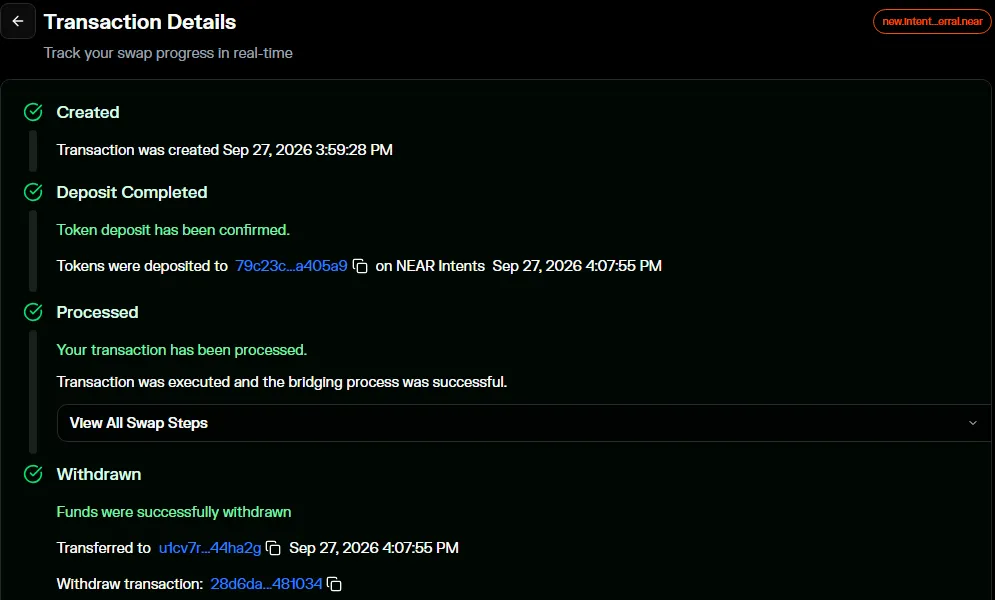
What our test cost and how long it took
| Our test |
|---|
| ZEC deposited from Phantom | 0.00266336 ZEC |
| ZEC received in the Zcash wallet | 0.00241336 ZEC, shielded |
| Cost on the ZEC side | 0.00025 ZEC (near.com showed "Fee 0 ZEC"; the cost is priced into the quote) |
| SOL spent on the deposit | 0.00156844 SOL, of which 0.00008 SOL was the network fee |
| Minimum | None hit. solswap listed a minimum deposit of 0.00000001 ZEC, and near.com accepted 0.0026 ZEC |
| Deposit, Phantom to solswap | 9 seconds |
| Withdrawal, signing on near.com to ZEC in the Zcash wallet | About 8 minutes (near.com estimated about 2) |
Records: Solana deposit 5ijsgRrh…AjLkx, NEAR Intents 79c23cfd…a405a9, Zcash 28d6da27…481034 in block 3,498,141. Fees and times change with network load, so the review screen is the final word when you do it.
NEAR's bridge publishes a 0.01 ZEC minimum and a 0.00047 ZEC fee for its standard Zcash withdrawals. near.com didn't apply either to our 0.0026 ZEC. If an app refuses a small amount, try near.com before you top up.
Other routes and what each one trusts
Every route out of Solana trusts the OmniBridge, because the bridge holds the ZEC that backs your token. On top of that:
- The route above trusts NEAR Intents. Your signature authorizes the transfer, solvers deliver the ZEC on the Zcash side, and NEAR Intents can hold funds for compliance review; in 2026 a Zcash holder reported a large swap held for weeks. You also connect your wallet to two websites, so check the address bar every time.
- Wallets with NEAR Intents built in (look for the NEAR Intents feature in the directory) use the same system from inside the Zcash wallet. Same trust, fewer websites. We didn't test this with ZEC on Solana.
- An exchange, only if it accepts deposits of this token on the Solana network, which most don't. You hand over custody and usually your identity, and many exchanges only send ZEC to
t1 addresses. See custodial exchanges.
Shield it and check
It arrived shielded. Our ZEC went to a u1 address and landed straight in the Ironwood shielded pool. There was no transparent step and nothing to shield by hand. The wallet listed it as Receiving… with a shield icon at 16:07 (UTC+1) while it collected confirmations.
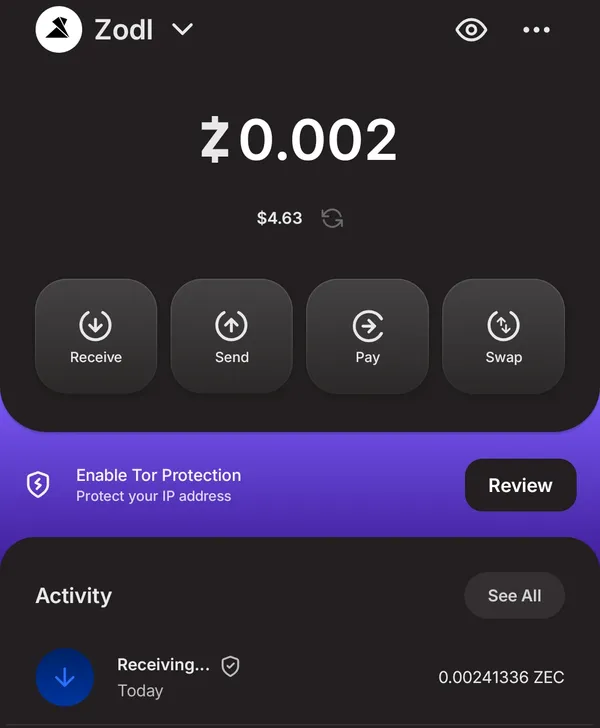
To check it yourself, open the transaction in your wallet and copy the transaction ID.
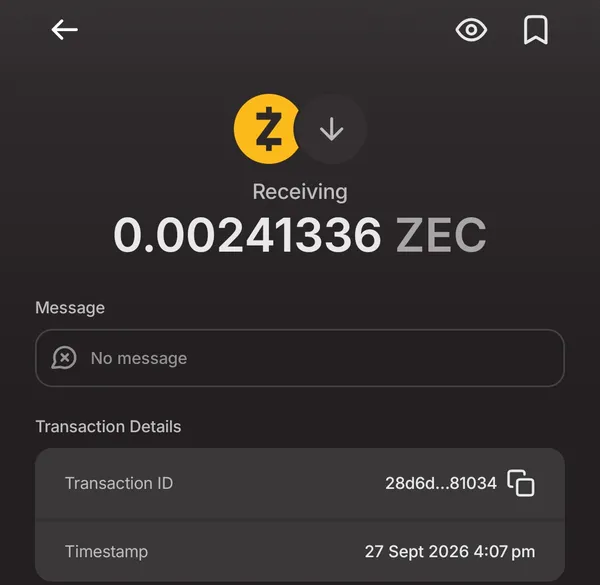
Paste it into the Zcash block explorer. Don't be thrown by the summary. Ours reads Shielded Inputs / Outputs 0 / 0 and Transferred from/to shielded pool 0.0 ZEC, because the explorer's summary doesn't count Ironwood yet. The t1 addresses you see are on the sending side (the ZEC it spent and the change it kept), not yours.
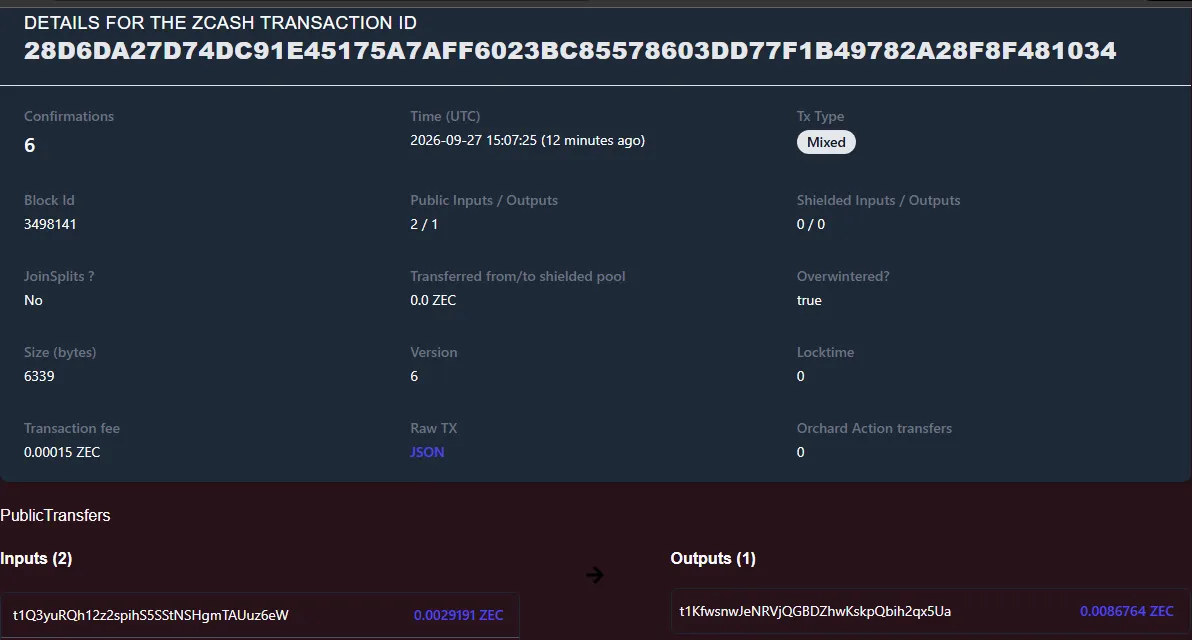
Click Raw TX: JSON and search for ironwood. A negative valueBalance there is ZEC entering the Ironwood pool. Ours was -0.00241336, exactly what arrived, and nothing in the transaction shows who received it.
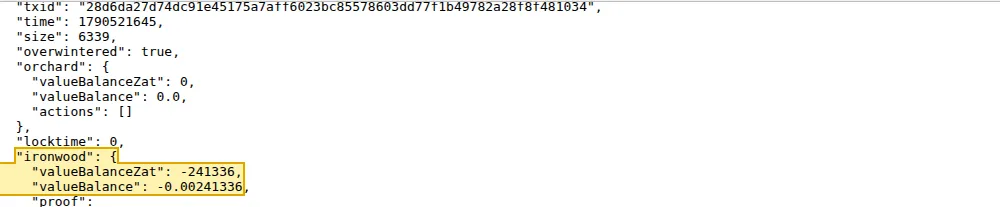
What a block explorer can see explains the rest of the fields.
If you paste a t1 address
We didn't send to one, but the result is predictable. The ZEC arrives in your wallet's transparent balance, and the explorer shows your t1 address and the amount to anyone, permanently. A wallet with automatic shielding then moves it into the shielded pool; otherwise tap Shield, which costs a small network fee. The shielding transaction is public too, since it spends from your t1 address. Nothing is lost, but the link between that deposit and your wallet stays on the chain. Paste the u1.
Stay safe
New holders get targeted. Almost every scam you'll see is one of these:
- Wrong address type. A Zcash address starts with
u1, t1, zs or tex1. A Solana address has none of those prefixes. Never send native ZEC to a Solana address, and never send the Solana token to a Zcash address.
- Transparent-only services. Some bridges, swap sites and exchanges can only send to
t1 addresses. That's workable if you shield the ZEC as soon as it arrives. Just don't leave it there.
- Fake wallets. Install only from the link on the wallet directory card or the official app store listing it points to. Fake crypto wallet apps do slip into app stores, and they look exactly like the real thing.
- Seed phrase phishing. No wallet, bridge, swap site, support agent, moderator or airdrop ever needs your seed phrase. Signing a message never involves typing it. Anyone who asks for it is trying to steal from you. Recovering funds covers the "we'll recover your wallet" version of this scam.
- Scam tokens and "claim" sites. Tokens called ZEC, Zcash or something close appear in Solana wallets unasked, often with a link to "claim" more. Connecting your wallet to that link can drain it. Check the contract address from the top of this page and ignore everything else.
- Malicious signature requests. A "Sign Message" request can move your NEAR Intents balance without any SOL fee. Only sign on
near.com or solswap.org, and only when the message names intents.near (step 5 above shows what to check).
- Look-alike sites. Type
solswap.org and near.com yourself or use bookmarks. Don't follow links from DMs, replies or ads.
Common Mistakes
- Using Phantom's Swap button instead of the deposit flow. You already hold the token — swapping just exchanges one paper ZEC for another token and gets you no closer to native ZEC.
- Pasting a
t1 address, or a u1 that hides a transparent receiver, when your wallet offers a shielded-only u1. The deposit lands public and links it to your wallet permanently.
- Assuming funds are stuck when solswap's Withdraw page shows "–". The balance follows your Phantom key, not the website — finish the withdrawal on near.com.
- Signing a message without checking it. A look-alike site can empty your NEAR Intents balance with one signature. The site must be
near.com and the message must contain "verifying_contract": "intents.near".
- Confusing the two "ZEC" tickers. The Solana token and native Zcash ZEC share a name but not a network — sending either to the other chain loses it.
What to do with shielded ZEC
Related Pages