Shielded Cold Signing
Key idea: The companion wallet sees everything needed to build and monitor a shielded transaction. The hardware wallet alone holds the authority to authorize a spend. That split is the entire point of shielded cold signing.
Shielding in Zcash involves moving funds from a public, transparent address into a private, shielded one, hiding transaction details using Zcash's privacy features.
What changes when you shield ZEC?
With a transparent Zcash transaction, information such as:
- sender address
- recipient address
- amount transferred
can be observed on the blockchain.
When you shield ZEC, your funds move into a private pool (such as Ironwood). The blockchain can verify that a transaction is valid without revealing your private transaction details. Since the NU6.3 upgrade on 28 July 2026, newly shielded funds go into the Ironwood pool as the older Orchard pool no longer accepts new deposits but still allows withdrawals.
Components Of A Shielded Transaction
1. The Note (The Shielded Balance Record)
A note is a private, cryptographic record representing an unspent amount of ZEC owned by a user.
Unlike a public blockchain, where balances are listed in cleartext, a shielded note encrypts the value and ownership details so that on-chain observers cannot see who owns the funds.
When initiating a transaction, the companion wallet scans the ledger, identifies the user's unspent notes, and selects which notes to spend.
2. The Nullifier (The Double-Spend Detection Mechanism)
Because the details of a note are hidden from the public ledger, the network needs a mechanism to detect double-spending without revealing which note is being spent.
A nullifier is a unique cryptographic marker derived from a specific note. When a note is spent, its nullifier is published to the blockchain.
The network verifies that the nullifier has not been recorded previously. If it has not, the spend can be accepted. Crucially, an outside observer cannot use the nullifier to determine which specific note it came from.
The companion wallet derives and constructs the appropriate nullifier as part of assembling the transaction data.
Keys
Keys are cryptographic pieces of information that control access to your funds and allow your wallet to perform operations such as receiving, viewing, and spending ZEC.
A wallet holds several different keys, each serving a different purpose, just like how a single account might have separate credentials for read access versus write access.
Keys are central to the relationship between the companion wallet and the hardware wallet, because different keys serve different purposes, and only one of them needs to stay locked away.
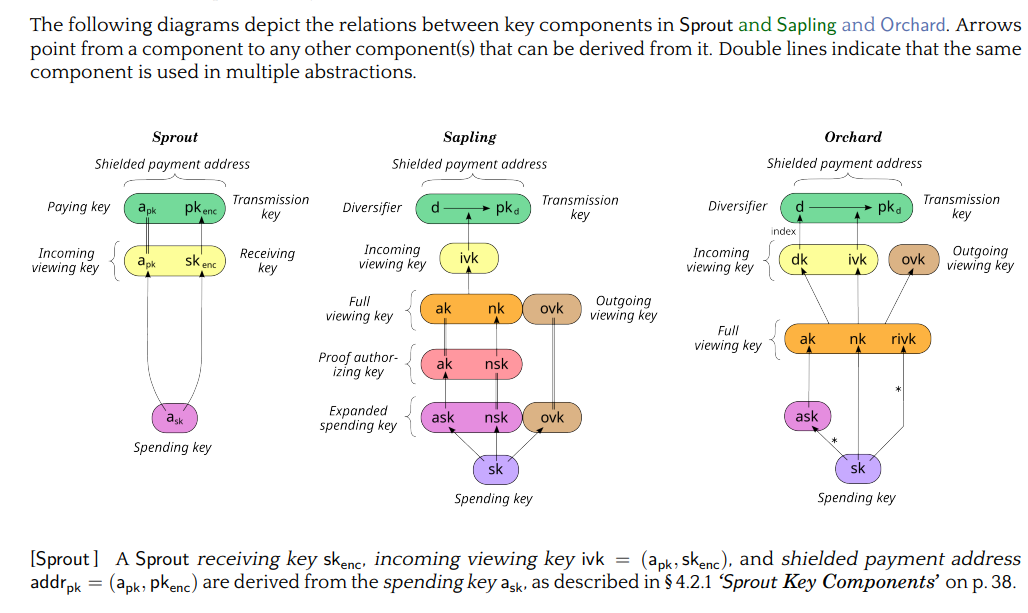
It is important to know that every shielded pool builds its keys as a derivation tree, where arrows point from a component to whatever can be derived from it. Users who wish to receive shielded payments must have a shielded payment address, which is generated from a spending key.
The key hierarchy
1. Spending key
This is the most security sensitive key. It gives the cryptographic ability to authorize spending of ZEC.
This is the key referred to whenever "the hardware wallet holds the key" comes up elsewhere in this report.
In a cold signing architecture, the spending key is kept inside the hardware wallet and never exposed to the companion wallet. The companion wallet should not need to possess this key at all.
In both Sapling and Orchard, key hierarchies derive spend authority and viewing capabilities as two distinct branches from a root spending key:
- Sapling: An expanded spending key (𝑎𝑠𝑘,𝑛𝑠𝑘,𝑜𝑣𝑘) derives proof-authorizing keys (𝑎𝑘,𝑛𝑠𝑘) and full viewing keys (𝑎𝑘,𝑛𝑘,𝑜𝑣𝑘), which further yield incoming viewing keys (𝑖𝑣𝑘) and diversified addresses.
- Orchard: A root spending key (𝑠𝑘) branches directly into a spend-authorizing key (𝑎𝑠𝑘) and a full viewing key (𝑎𝑘,𝑛𝑘,𝑟𝑖𝑣𝑘).
This structural split provides the formal cryptographic foundation for hardware key isolation which involves the wallet exporting the viewing branch (UFVK) to the host computer for balance synchronization and transaction building, while keeping the spend-authorizing branch permanently locked on device.
Key derivation is strictly unidirectional. This means viewing keys cannot be reversed to reconstruct spending authority. The cryptographic irreversibility makes exporting a Unified Full Viewing Key (UFVK) safe because it grants complete wallet visibility without exposing on device spending secrets.
2. Viewing keys
Zcash separates the ability to see shielded activity from the ability to spend it. A viewing key lets a wallet or other authorized party view information about shielded transactions without granting spending authority.
- Full Viewing Key (FVK), wrapped as a Unified Full Viewing Key (UFVK): deliberately derived from the spending key, it lets software detect and decrypt the wallet's shielded activity, thereby identifying transactions. It also lets it compute balances without being able to authorize a spend. It is best described as a less private derivative of the spending key, not a weaker copy of the seed.
The Full Viewing Key (FVK) provides complete read-only visibility while maintaining strict security separation. By decrypting both incoming and outgoing note ciphertexts (via its outgoing-viewing-key component), an FVK-only companion wallet can render a complete, labeled transaction history rather than just a running balance.
Multiple unlinkable diversified payment addresses share the same FVK and incoming viewing key (IVK), allowing unlimited address generation without increasing blockchain scanning overhead.
This functional separation forms the foundation of cold signing workflows. All continuous chain scanning, history tracking, and address management are offloaded to host software, while spend authority remains isolated on the hardware device.
The critical distinction: UFVK vs. spending key
The UFVK can be shared. The spending key must stay on the hardware wallet.
The companion wallet uses the viewing key to monitor the wallet, detect incoming funds, identify notes, and help prepare transactions. It does not have the private key needed to authorize spending.
As stated earlier, the separation of keys is the foundation of the cold signing architecture.
The companion wallet can do most of the work needed to prepare a transaction without ever having control over the funds. The hardware wallet only needs to receive the prepared transaction and perform the final signing operation.
Hardware wallet manufacturers don't need to invent this separation themselves. Zcash's key design already separates viewing capabilities from spending authority at the protocol level, and manufacturers simply build their signing and export functions on top of that existing structure. The protocol allows information such as a shielded address or full viewing key to be derived from a spending key, while the spending key itself remains private, making it possible for hardware wallets such as Ledger, Keystone, and Hito to give companion software the viewing information it needs without ever exposing the private key that can spend the funds.
Using the viewing key material, the companion wallet can:
- identify your funds and notes
- determine which notes can be spent
- derive or identify relevant addresses
- construct the transaction
- generate or coordinate the required proofs
- prepare the transaction for signing
It is important to know that needing to construct a transaction is not the same as needing the private spending key. That decoupling is one of the core security ideas behind hardware wallet integration.
Shielded Transaction Construction and Authorization
These are the processes involved in creating and authorizing the transaction. In simple terms these processes are what the wallet actually does with that data to send money:
Transaction Construction (Assembling the Shielded Transaction)
Transaction construction is the process of assembling the information required to create a valid Zcash transaction from the user's intended payment.
The transaction construction process combines the selected notes, recipients, amounts, fees, nullifiers, and other required transaction data into a transaction structure. For shielded transactions, it also prepares the information required for the generation of the necessary zero knowledge proofs and signatures.
The companion wallet generally performs this stage. It
- Selects the notes to spend
- Determines the transaction's inputs and outputs
- Calculates the necessary values
- Prepares the transaction data that will later be proved and signed.
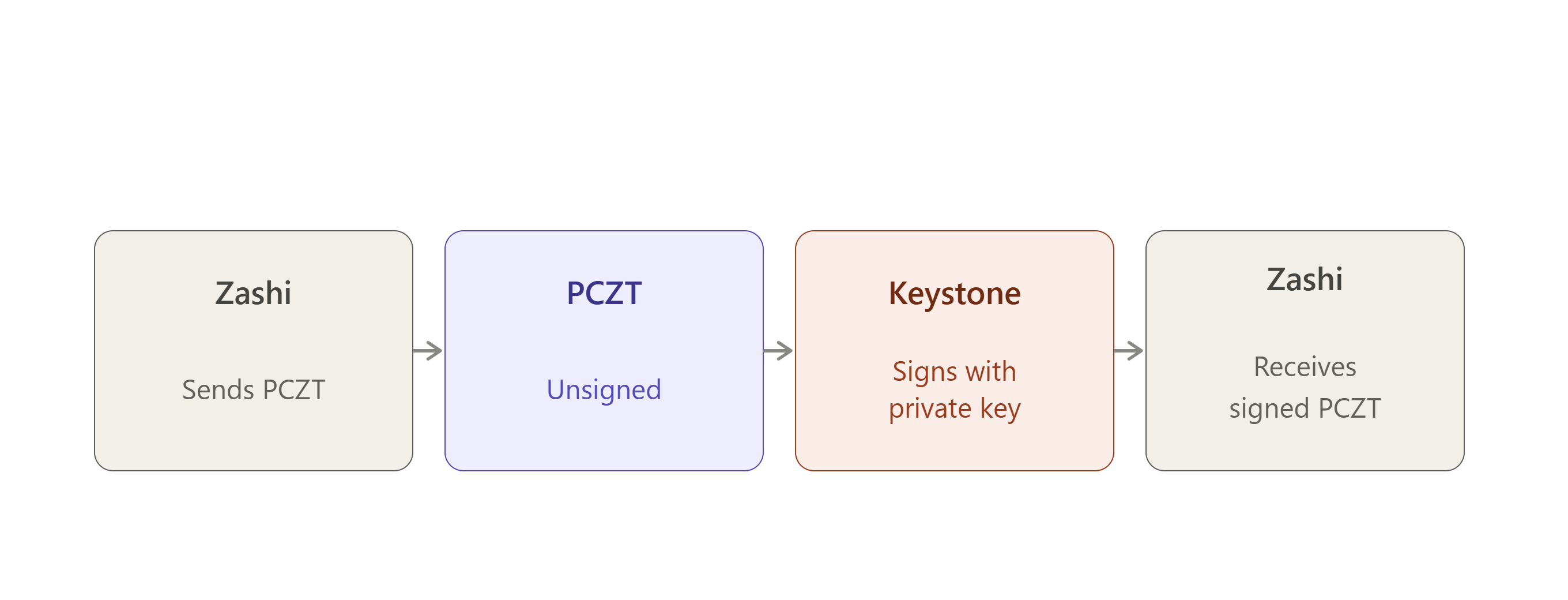
In a cold signing setup, the resulting transaction data can be packaged into a PCZT and passed to the hardware wallet for the security-critical signing step.
Proving (Demonstrating Protocol Validity)
Proving refers to the generation of zero knowledge proofs (such as Halo 2 or Groth16) that demonstrate a transaction follows Zcash protocol rules.
The proof helps the network guarantee:
- The spending user is authorized to spend the notes
- The notes actually exist
- The corresponding nullifiers are unique
- Total inputs equal total outputs plus fees.
It does all this without revealing any underlying private details.
Proof generation is computationally intense. Offloading this responsibility to the companion device prevents the hardware wallet from stalling or running out of memory.
Signing (Authorizing the Spend)
Signing is fundamentally distinct from proving. A digital signature acts as an explicit authorization stamp produced by the private key holder.
While a zero knowledge proof verifies transaction validity, a digital signature proves spending authority. The signature certifies that the true owner approves the specific transfer parameters.
Signing requires minimal computing power, making it ideal for a hardware wallet.
What is shielded cold signing?
Shielded cold signing is a method of authorizing a Zcash shielded transaction while keeping the private spending keys isolated from the internet-connected companion wallet. The transaction can be constructed and prepared on an online computer, while a separate hardware wallet, kept offline or otherwise isolated, uses its protected keys to authorize the transaction.
The process can be simplified as:
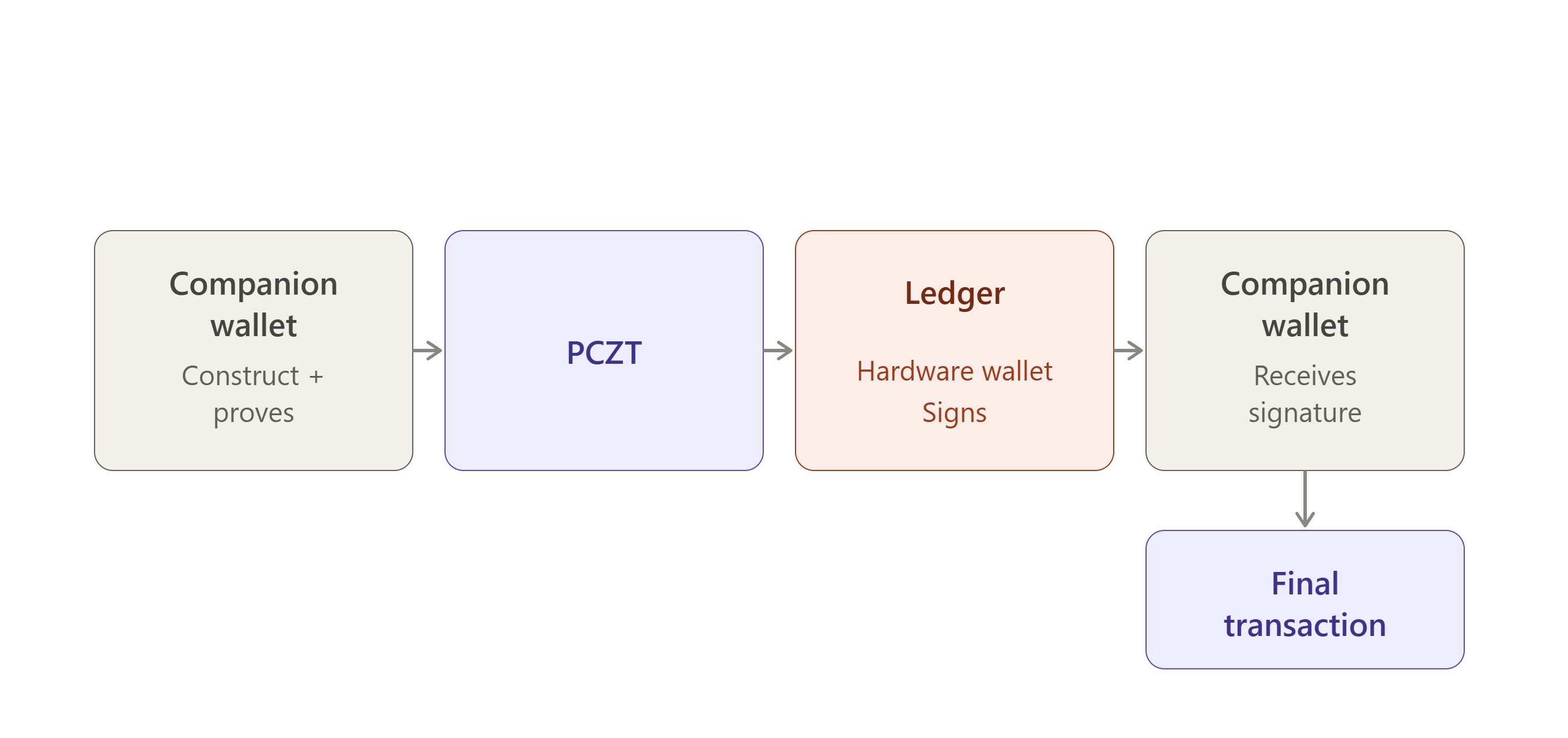
The companion wallet sends the structured transaction parameters to the hardware device, which signs the payload internally without ever releasing the private spending key to the host machine.
Companion And Hardware Wallets
Shielded transactions can involve both a companion wallet and a hardware wallet, with each serving a distinct function.
Companion Wallet
What is a companion wallet?
The companion wallet runs on a computer or mobile device and performs most of the tasks involved in creating the transaction, such as:
- Selecting the notes to be spent
- Constructing the transaction
- Calculating the necessary transaction data
- Coordinating the generation of the required zero-knowledge proofs.
Why is a companion wallet useful?
The companion wallet handles the transaction creation process, but if the computer gets malware, an attacker might be able to:
- see what you're doing,
- modify an unsigned transaction,
- try to trick you into approving something.
The companion wallet does not need to have access to the private key stored on the hardware wallet, it can therefore handle transaction construction and other computational tasks while the hardware wallet provides the security boundary for the private key.
Hardware Wallet
A hardware wallet is an offline physical device that isolates your private keys from connected phones or computers, acting like a secure vault for your crypto assets.
Why is a hardware wallet useful?
If your computer gets malware, an attacker might be able to:
- see what you're doing,
- modify an unsigned transaction,
- try to trick you into approving something.
The private key cannot simply be extracted from the hardware wallet therefore the device can act as a security boundary.
Image companion vs hardware capabilities
The separation between these two wallets is particularly important for shielded transactions because they are more complex than transparent transactions and involve components such as shielded notes, nullifiers, commitments, zero knowledge proofs, and transaction signatures.
It would be impractical for the hardware wallet to perform every computational operation. Instead, the companion wallet prepares the transaction and provides the necessary information to the hardware wallet for signing, while the private spending key remains isolated within the hardware device.
Key Isolation
Key isolation means the private keys that can authorize a spend never leave the hardware wallet. The companion can prepare the transaction; it cannot sign it.
Key isolation refers to keeping the private keys required to authorize a transaction separate from the companion wallet and the device on which it runs. In a shielded cold signing setup, the companion wallet can construct the transaction and coordinate the required proofs, while the hardware wallet keeps the sensitive private spending keys isolated.
If the companion computer or phone is compromised, an attacker may be able to interact with the transaction before it is signed, but ideally cannot extract the private key from the hardware wallet. The key therefore remains within the security boundary of the hardware device.
This separation allows the companion wallet to perform transaction construction and computational tasks without giving it direct access to the key material required to authorize the transaction.
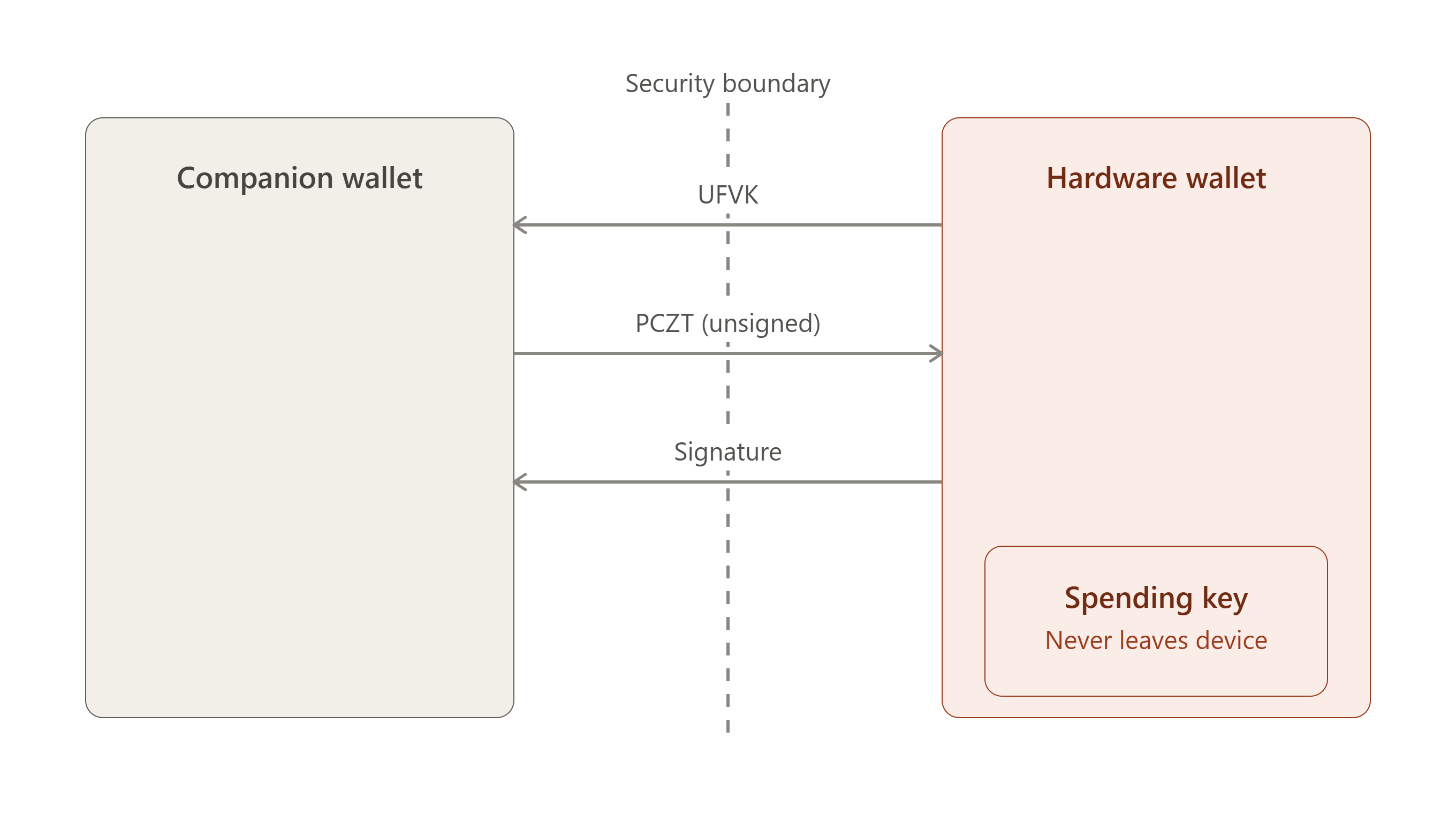
The key distinction to make is that "viewing key" does not mean the app receives a weaker version of the seed.
In Zcash, a Full Viewing Key (FVK/UFVK) is deliberately derived from the spending key and gives the holder the ability to detect and decrypt relevant shielded activity, but not authorize spends. The FVK is a less-secret derivative of the spending key.
One important privacy caveat:
So it should be known that the app cannot steal the funds with only the UFVK but it can see the wallet’s private shielded activity.
That's why it is more accurate to describe the companion application as having viewing authority, rather than simply saying it has "public information."
The simplest way to state the whole idea is that the companion wallet gets enough key material to know what is happening to the wallet, but not enough key material to authorize what happens to the wallet's funds. The hardware wallet however keeps the spending authority isolated and uses it only when the user approves a transaction.
That is the core key isolation model behind these shielded Zcash hardware wallet designs and it's the same model that shows up, implementation by implementation, in Ledger, Keystone, and Hito which will be covered soon.
PCZT
PCZT stands for Partially Created Zcash Transaction. It is the package that carries a Zcash transaction and the information needed to finish it from one stage to another.
It is a standardized format for a Zcash transaction while the transaction is still being built. It allows different participants or devices to perform different parts of the transaction creation process and pass the partially completed transaction between them.
Constructing a transaction is significantly more complex than signing a simple public transfer in zero knowledge cryptocurrency protocols like Zcash. Shielded transactions require computationally intensive zero-knowledge proofs, such as those generated using Halo 2 or Groth16. As a result, low-power devices such as hardware wallets may lack the memory and processing capacity to handle the entire transaction workflow.
The introduction of PCZT addresses several core challenges in shielded crypto architecture. PCZT is a standardized intermediate data format that breaks transaction creation into modular, independent roles. It allows a powerful companion computer to handle transaction assembly and proof generation while restricting an offline hardware wallet strictly to authorization and signing.
Hardware and Cold Storage Limitations
While hardware wallets provide a secure environment for protecting private spending keys, they typically have limited RAM, computing power, and data transfer capabilities compared with companion computers. These constraints make it impractical for them to perform computationally intensive zero knowledge proof generation or maintain the complete transaction state required during the transaction construction process.
As a result, the companion wallet can handle the computationally demanding tasks, while the hardware wallet remains focused on the security critical operation of authorizing the transaction with its protected spending keys.
Makes you wonder, if the device is this constrained, how does it still do enough verification to be trustworthy?
Well to put it simply, a hardware wallet cannot accept an arbitrary value from a companion computer and sign it. It needs sufficient information to establish that the value being signed corresponds to the transaction the user intends to authorize. This creates a difficult balance because the device must perform enough parsing and verification to protect the signing process, while operating within strict limits on memory, computation, firmware size, and implementation complexity.
Ledger's Orchard PCZT handling is an example of this challenge, suggesting that specialized circuit-dependent parsing can make implementation more manageable on constrained devices but may also require firmware changes when supported transaction structures or circuits evolve.
Two ongoing efforts illustrate different responses to this same constraint.
A research proposal into a fully constant time proving pipeline suitable for open-source hardware wallet architectures and ordinary computers was put forward in Grant #423. The goal was to investigate cryptographic infrastructure that can be implemented securely in environments such as C or Rust while reducing the complexity and maintenance burden of shielded Zcash support.
An alternative approach however is represented by the proposed Zcash SeedSigner which is an open-source, air-gapped signer built from inexpensive readily available components. Its proposed workflow keeps the companion computer separate from the signing device, passing a PCZT across an air gap for on-device verification and signing.
https://forum.zcashcommunity.com/t/grant-application-research-on-a-fully-constant-time-proving-pipeline-for-open-source-hardware-wallet-architectures-reusable-for-standard-computers/57555
Together, these approaches illustrate the broader engineering challenge behind shielded hardware wallets: transaction construction and proving can occur outside the security-critical device, but the signer must still have enough information and verification capability to safely authorize the resulting transaction.
PCZT Enables the Split Architecture
The Partially Created Zcash Transaction (PCZT) standard is the formal data structure that connects the companion wallet and the hardware wallet.
A companion wallet is able to handle note selection, work out the nullifiers, and generate the zero knowledge proof all on its own. This is possible because the information needed for these steps, including the key used to derive nullifiers, comes from the viewing key rather than anything tied to spending authority. The companion wallet then packages these elements into a PCZT container.
The PCZT is handed to the hardware wallet, which reads the transaction context (such as amounts and recipient addresses), applies the signature using its protected spending keys, and hands the updated PCZT back to the companion device.
This design establishes a strict security boundary: powerful host hardware can perform complex zero knowledge math without needing access to spending keys, while low power cold storage devices can enforce financial security without needing to compute heavy cryptography.
Prover Privacy Compromises
While delegating zero knowledge proof generation to the companion wallet or another prover keeps the spending keys isolated, it still requires the prover to access sensitive transaction information, such as note values, recipient addresses, and commitments.
The PCZT maintains the architectural separation by ensuring that this information can be provided for proving without transferring the private spending keys required for authorization.
This guarantees proving authority is separated from spending authority. The prover can perform the computationally intensive proof generation without gaining the cryptographic authority to spend the user's funds.
PCZT Interoperability
As PCZT becomes an important part of Zcash hardware wallet, multisignature, and air-gapped signing workflows, interoperability between independent implementations becomes increasingly important.
A June 2026 proposal by AngryDavee noted that PCZT implementations already existed across projects including Ledger, Keystone, Hito, OneKey, and the reference implementation in librustzcash. However, the proposal identified a lack of shared tests for confirming that these implementations interpret PCZTs consistently.
The proposed solution was an open-source interoperability test suite containing canonical PCZT test vectors and cross-implementation tests covering the complete create → sign → finalize workflow. It also proposed testing role boundaries such as the Combiner, where partially signed information from different signers may be combined before a transaction is finalized.
This is particularly relevant to hardware wallets because PCZT allows transaction construction and signing to be separated: a companion wallet can construct a transaction and prepare a PCZT, while a hardware device receives the required signing information and performs the security critical signing operation.
The proposal was not implemented because Zcash Community Grants decided not to move forward with the grant after reviewing the proposal and considering community feedback. As a result, the proposed cross-implementation test suite was not developed through this grant. It is therefore a proposed response to an identified PCZT interoperability challenge, not a standard that currently exists across Zcash.
https://forum.zcashcommunity.com/t/pczt-interoperability-test-suite-feedback-before-at-grant-submission/55931
The Lifecycle of a PCZT
| # | Stage | Description |
|---|
| 1 | Creator | Initializes the PCZT with global transaction metadata, including transaction versions, consensus branch IDs, and pool flags. |
| 2 | Constructor | Populates the transaction with intended inputs and outputs across transparent, Sapling, Orchard, or Ironwood pools. |
| 3 | IO Finalizer | Declares the set of inputs and outputs complete, calculates binding signature keys, and signs dummy spends where required. |
| 4 | Updater | Attaches necessary context data for subsequent participants, such as full viewing keys, anchors, and Merkle witnesses. |
| 5 | Prover and Signer | Executes zero-knowledge proof generation and cryptographic signing. In modern PCZT versions, these two tasks are fully independent and can occur sequentially or in parallel. |
| 6 | Combiner | Merges multiple PCZT instances deterministically if different devices work on aspects of the same transaction simultaneously. Merging rules require strict conflict resolution to prevent accidental data loss. |
| 7 | Spend Finalizer & Extractor | Validates all required cryptographic elements, strips intermediate context metadata, and produces the finalized Zcash transaction ready for network broadcast. |
Real World Hardware Wallet Implementations
At a glance
| Device | What the companion receives | What stays on the device | Transport |
|---|
| Ledger | UFVK / Orchard FVK, addresses | Spending authority | USB / BLE |
| Keystone | UFVK + Unified Address | Seed / spending keys | QR (air-gapped) |
| Hito | UFVK, Unified Address, seed fingerprint | Seed and private spending keys | QR / local |
Several hardware wallet implementations have been developed to explore how Zcash shielded transactions can be supported while keeping sensitive spending keys isolated from the companion wallet. Ledger, Keystone, and Hito represent different approaches to integrating hardware based key protection with the Zcash transaction workflow.
To understand how they protect shielded funds, it is important to distinguish between spending keys and viewing keys. Across all three, the split follows the same shape:
| Device | What the companion app can receive | What remains protected on device |
|---|
| Ledger | UFVK / Orchard FVK, addresses and public information | Spending authority / private key material |
| Keystone | UFVK + Unified Address | Seed / spending keys |
| Hito | UFVK, Unified Address, seed fingerprint and network information | Seed and private spending keys |
Ledger as the Hardware Signing Environment
Ledger is a hardware wallet company. Its devices are built around a Secure Element which is a dedicated chip designed to hold private key material and keep it physically isolated from the rest of the device, and from anything connected to it. That Secure Element is the whole reason a Ledger device is trustworthy for cold storage. This means even if the computer or phone plugged into it is compromised, the keys inside the Secure Element can't be extracted.
On its own, though, a Ledger device is blank with respect to any specific cryptocurrency. It needs an application installed on it that knows how to handle that currency's particular cryptography.
A Ledger device is blank with respect to any specific cryptocurrency therefore it needs an application that knows that currency’s cryptography. For Zcash there have been two generations:
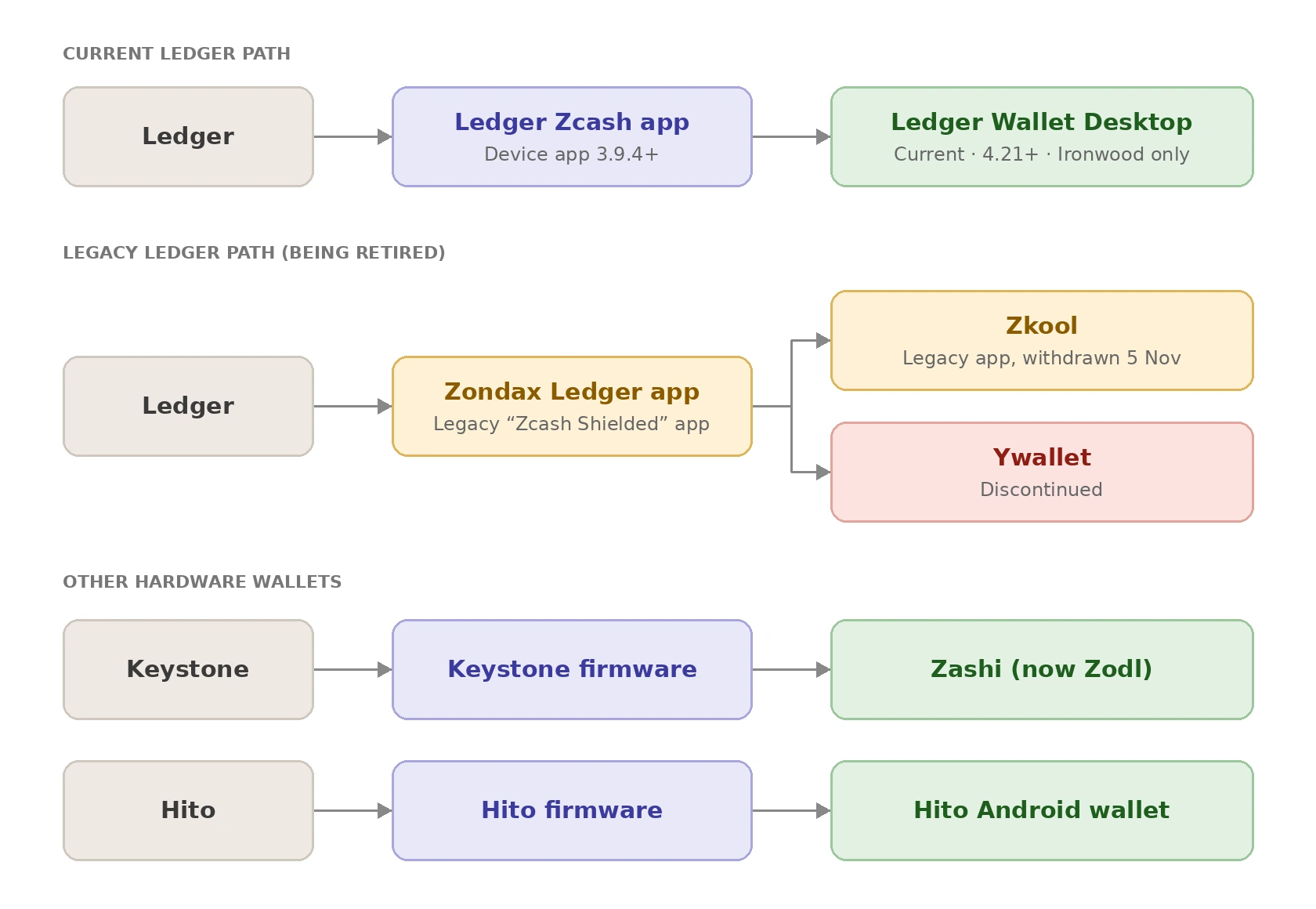
- The original Zondax-built “Zcash Shielded” app, used with companion wallets such as Zkool and being withdrawn on 5 November 2026 and,
- Ledger’s newer Zcash app (3.9.4+), used natively by Ledger Wallet Desktop 4.21+ for Ironwood shielded ZEC.
The key isolation model below applies to both.
Zkool is the companion wallet on your phone or computer that talks to that app. It constructs the transaction, sends it to the Ledger, the Zondax app on the device then signs it and sends the signature back.
So Zondax is the software running on the hardware, Zkool is the software running outside it using Zondax's app to communicate with the device.
What leaves the Ledger?
Ledger's Zcash software includes a specific function for exporting the wallet's viewing key, which is the key that lets software see balances and transactions without being able to spend anything.
This function can return one of two things:
- A Unified Full Viewing Key (UFVK), which is the full viewing key covering all of Zcash's shielded pools at once, or
- An Orchard Full Viewing Key (FVK)
Either way, what comes out is only ever a viewing key. No matter which version you request, this function has no way to return the one piece of information that would actually let someone move funds, the spending key.
That's the whole point of how it's built though, it's designed so the only thing it's capable of exporting is something safe to hand to a companion app.
Zcash's key hierarchy is structured such that for each shielded pool, the spending key derives two separate things:
- A spend-authorizing key, and
- A full viewing key
The FVK can then derive further viewing-related capabilities of its own, but at no point does that derivation path lead back to spending authority. Once a key has branched into the viewing side of the hierarchy, it stays there and cannot be used to reconstruct the spending authority key it came from.
Ironwood follows this same pattern, since it reuses Orchard's underlying key and note construction. It is, however, a distinct pool at the consensus level, with its own commitment tree and nullifier set. That means a UFVK is really a bundle of per-pool viewing keys (transparent, Sapling, Orchard, and now Ironwood), not a single flat key.
A UFVK exported before Ironwood activated won't include an Ironwood viewing key, since that pool didn't exist yet. This is exactly why wallets needed to update to recognize and derive Ironwood-capable UFVKs after the NU6.3 upgrade.
What stays on Ledger?
The spending authority remains on the device.
The Ledger Signer receives a transaction/PCZT from the host and generates the spend authorization signature depending on which pool the transaction spends from (the Ironwood pool because Ledger’s current integration supports Ironwood only). The signature is then produced on the device, and the host receives only the signature, not the private spending key.
This is also consistent with Ledger's general security model. Its Secure Element isolates private key material, and Ledger's application security requirements specifically prohibit applications from exposing those secrets to the host.
Ledger's signer can export the FVK/UFVK while independently performing transaction signing. The two capabilities are provided through separate functions, not bundled into one.
What does that mean in practice?
Suppose your Ledger contains 10 ZEC.
The companion wallet can have the UFVK and therefore determine: "This wallet has received 10 ZEC." It can scan and display transactions and balances.
But if someone compromises the companion wallet, the UFVK alone does not give them the ability to create the spend authorization signature.
The purpose of the separate spend authorization signature is to enable constrained devices such as hardware wallets to authorize shielded spends without having to perform the full zk-SNARK proof themselves.
Zondax Ledger application; the hardware wallet side
What is Zondax?
Zondax is a third-party development firm that built the Ledger Zcash app. It is the actual firmware application that runs on Ledger hardware and gives the device the ability to understand and process Zcash transactions in the first place.
Zondax is an outside developer. Ledger hardware has no innate ability to process Zcash transactions, and that capability comes entirely from Zondax's software.
Original Zcash Ledger implementation
Zondax's Ledger Zcash app repository is the software that runs on a Ledger device. The app was initially focused on Sapling shielded transactions, before Orchard existed as Zcash's primary shielded pool, so Sapling support was the extent of what a Ledger device could do with shielded ZEC.
Its architecture illustrates the separation, with the host/companion side preparing transaction information while the Ledger handles sensitive key operations and signing.
Even in this earliest version of Zcash hardware wallet support, the core principles which are construction and proving on the host then signing isolated on the device, were already the design.
Evolution toward Orchard
Ledger's work moved toward Orchard + PCZT. This was a meaningful transition rather than a minor update given that Orchard uses a different proving system (Halo 2, versus Sapling's Groth16) and a different note and key construction, so extending Sapling-only firmware to handle Orchard signing required new cryptographic groundwork on the device side, not just a firmware patch.
However, as Zcash moved toward Ironwood, Zondax and Ledger shifted their development focus toward supporting Ironwood directly, rather than completing an Orchard implementation only to subsequently redesign it for Ironwood. This represents a further stage in the evolution of the Ledger implementation, as Ironwood builds on the Orchard cryptographic architecture while introducing a separate shielded pool and additional protocol changes.
What happens inside this Ledger app
The resulting flow is described as:
- The host constructs a PCZT.
- The host sends the relevant transaction information to the Ledger device.
- The device produces the Orchard spend-authorizing signatures.
- The host handles everything downstream of that including the binding signature and final transaction assembly.
The app running inside the Ledger never sees or produces anything beyond the spend authorization signature itself, and all the computationally heavy or data-hungry work (proving, binding, assembly) stays on the host, where it doesn't need to be trusted with key material.
Ledger's native shielded integration; Ledger Wallet Desktop
Ledger's latest Zcash integration provides a concrete example of how shielded transaction construction and security-critical signing can be separated between companion software and a hardware wallet.
With Ledger Wallet Desktop 4.21+ and the Zcash device app 3.9.4+, users can send and receive Ironwood shielded ZEC directly through Ledger Wallet Desktop. The integration supports private-to-private transfers, shielding from the transparent pool, unshielding to the transparent pool, private receiving addresses, and memos. Transactions are verified and signed on the Ledger device rather than relying solely on information presented by the computer.
A key part of this architecture is the separation of viewing and spending capabilities. During private balance synchronization, the Ledger exports a Unified Full Viewing Key (UFVK), which is stored locally on the computer. The UFVK allows Ledger Wallet Desktop to detect relevant shielded transactions and determine the wallet's balance, but it does not provide the authority to spend the funds. The security-critical spending authority remains on the Ledger device, which performs the final signing operation. This creates a clear boundary between the computer, which manages wallet state and constructs transactions, and the hardware device, which protects the capability required to authorize spending.
However, the current integration is specifically Ironwood-only. It does not display or manage Orchard or Sapling funds through Ledger Wallet Desktop. This is significant historically because Ledger's earlier Zcash development was associated with Orchard shielded support before the implementation evolved toward the Ironwood protocol.
The transition also highlights the importance of key and account compatibility. Ledger has an older “Zcash Shielded” application developed by Zondax and used by integrations such as YWallet and zkool, which is now being retired. Because that older application used a different derivation scheme for shielded accounts, its Sapling accounts cannot simply be reproduced by the new Ledger application.
The integration therefore illustrates both the progress and remaining limitations of shielded hardware wallet support. Ledger can now provide a full Ironwood experience in which the companion software handles wallet synchronization and transaction preparation while the hardware device remains the security boundary for spending.
At the same time, historical account compatibility, support for only specific shielded pools, hardware transaction size limits, platform restrictions, and the computational and firmware constraints involved in parsing and verifying shielded transactions show that hardware wallet support for Zcash depends not only on protocol capabilities, but also on the design and resources of each individual implementation.
Zkool + Ledger — using the official Zondax app
As Ywallet's successor, Zkool inherited the goal of shielded cold signing but took a different path to reach it, one shaped directly by the fact that cryptography alone doesn't make an integration usable if the signing app can't be distributed safely.
https://youtu.be/eagkCIv3BlQ?si=7w5YfLlRER77bASw
Zkool's use of the Zondax application
Zkool moved toward using the official Ledger Zcash app developed by Zondax, rather than Ywallet's abandoned proprietary Ledger application. Instead of maintaining a custom app that Ledger's store wouldn't accept, Zkool built on the app that was already accepted and distributed through Ledger's own ecosystem.
That shift meant users no longer needed to rely on installing an unsigned custom Ledger application to use this integration, since Zondax's app was officially distributed through Ledger's ecosystem.
However, this integration faces an important change on 5 November 2026, when support for the legacy Zcash Shielded app is scheduled to end as Ledger phases it out. Because Zkool's Ledger integration relies on this application, the change raises questions about the future availability of the existing connection. The precise impact on Zkool depends on whether it can continue using the legacy app outside Ledger Wallet or transition to a compatible alternative.
Supported shielded pools
According to the Ywallet developer, Zkool's Ledger integration used the official Ledger application developed by Zondax and supported both transparent and shielded Zcash. However, its shielded support was limited to Sapling and did not support Orchard, alongside other integration limitations such as a maximum of five inputs and outputs of each type and the absence of Ledger Live compatibility.
This limitation reflected the scope of the underlying Zondax Ledger implementation at the time. Zondax's earlier Ledger work provided Sapling support, and its subsequent 2024 release of the Zcash Shielded Ledger app initially excluded Orchard and Unified Addresses. Therefore, an integration built around that application inherited the capabilities and limitations of the hardware wallet implementation on which it depended.
The situation subsequently evolved with the release of the dedicated Zcash Shielded Ledger App in November 2024. Zondax stated that the application had been officially released through Ledger Live and later published integration guidance and Rust and JavaScript packages to enable other wallets to integrate with it. At launch, however, the application communicated exclusively with Zecwallet Lite Desktop, while broader wallet integrations were still being developed.
The next stage was the development of Ledger's newer Rust-based Zcash application. By June 2026, Ledger reported that UFVK sharing and Orchard Unified Address generation had been implemented, while Orchard transaction signing and ClearSign were still under development. Ledger also stated that the work would carry forward into the Ironwood path as the protocol changed.
Ironwood subsequently required updates across the Zcash wallet ecosystem. Zkool released support for Orchard to Ironwood migration beginning with version 6.24.0, and continued refining the migration and transaction pipeline in subsequent releases. Ledger, separately, merged PCZT v2 signing into its new application on July 27, although the implementation had not yet completed Ledger's review and Ledger Live rollout by August 20, a milestone that has since shipped, with Ledger Wallet Desktop 4.21+ now offering native Ironwood support directly.
https://forum.zcashcommunity.com/t/a-path-forward-for-ledger-and-zcash/50951/177
Thus, the evolution is better understood not as a single Zondax-to-Ironwood upgrade, but as several related developments: the original Sapling-focused Zondax implementation, the 2024 Zcash Shielded Ledger App, the newer Ledger Rust application with Orchard and PCZT support, Ledger's own native integration in Ledger Wallet Desktop, and parallel updates to wallets such as Zkool as the ecosystem transitioned to Ironwood.
Zcash support on Ledger depends on
- The device model
- The application installed
- The platform used to manage it and,
- Whether the transaction is transparent or shielded.
As of 21 July 2026 (Ledger’s last update), the Zcash Shielded app is supported on the Nano S Plus, Stax, and Flex, but not yet on the Nano X or Nano Gen5.
The Nano X and the other models except the original Nano S can still use the classic Zcash app, which supports transparent transactions and the spending of shielded funds to transparent addresses (deshielding), but not shielded-to-shielded signing. The original Nano S supports neither app, because Ledger is phasing out support for the device and its latest Zcash app is unavailable on it. Devices connect to Ledger Wallet (formerly Ledger Live), Ledger’s companion application, which is available on desktop for Windows, macOS and Linux and on mobile for iOS and Android.
Ledger has added native shielded Zcash to Ledger Wallet Desktop, built on the Ironwood pool, which removes the need for a separate companion wallet. Shielded ZEC is not yet supported on Ledger's mobile app for iOS and Android, although mobile support is planned for a future release.
Outside Ledger’s own software, shielded use depends on a compatible companion wallet and its supported platforms. As Ledger continues to expand Ironwood support, compatibility depends on the device model, firmware, app version, and operating system, so general Zcash support does not necessarily guarantee compatibility.
https://www.youtube.com/watch?v=VhkhfG0LCFs
YWallet cold signing; an earlier approach
Ywallet is a companion wallet, separate from both Ledger and Zondax, that pursued its own path toward shielded cold signing.
Ywallet is important historically because it explored cold signing for Zcash, meaning the signing device could be kept separate from the online wallet.
To realize that architecture on Ledger hardware, Ywallet built its own Ledger application, a proprietary app, distinct from the Zondax app covered in the previous section. This meant Ywallet wasn't relying on Zondax's existing Sapling implementation; it had its own firmware running the signing side of the relationship.
Why the integration mattered
Having the cryptography and signing code is not enough. Hardware wallet integration isn't purely a cryptographic problem, it's also an unavoidable distribution and platform problem. At minimum, it involves:
- Application approval/distribution — whether the hardware manufacturer's official app store will accept and distribute the app
- Firmware/application security — whether the app meets the manufacturer's security requirements for handling key material
- Communication protocols — how the companion wallet and the device actually exchange transaction data
- Compatibility with the wallet — whether the signing app's data formats and flow match what the companion wallet expects
- Supported shielded pools — which of Sapling, Orchard, (and now Ironwood) the app can actually sign for
Ywallet's proprietary Ledger app satisfied the cryptographic and architectural requirements; it could sign shielded Zcash transactions, but it wasn't accepted into Ledger's official app store.
Transition away from the proprietary Ledger app
Because the app wasn't officially accepted, Ywallet would have had to ask users to install unsigned firmware to use it, this is a real security compromise for users, and Ywallet chose not to ask this from them. So Ywallet eventually dropped that particular integration rather than take that path.
Rather than reviving a proprietary app, later development (via Zkool, Ywallet's successor) moved toward the official Zondax-built Ledger app instead, trading a custom, rejected implementation for a standardized one already accepted into Ledger's distribution ecosystem. That shift is what eventually made a working Ledger integration possible again.
Ywallet's legacy
Even after Ywallet itself stepped back from active development, its creator, Hanh who also happens to be a ZCG member remained a relevant voice in the ecosystem, particularly when Ironwood's migration surfaced reported issues around funds that appeared to have disappeared.
ZODL: a real user experienced missing funds after the Orchard → Ironwood migration
A user, Jmo0615, reported that funds previously visible in their ZODL wallet no longer appeared after the Orchard-to-Ironwood migration. They stated that they had restored the original seed, reset and recovered the wallet, and allowed ZODL version 3.14.1 (1) to fully synchronize. They also confirmed that no Keystone hardware wallet was involved.
It has not established that the funds were actually lost. Rather, it is suspected to be a wallet discovery or migration related issue, where previously visible funds were no longer displayed after the transition to Ironwood. Funds that are not detected or displayed should not automatically be described as funds that have been permanently lost and this distinction is important when understanding migration problems.
https://forum.zcashcommunity.com/t/funds-not-showing-since-ironwood/57792
Zkool: "locked notes" can explain apparently unavailable funds
Another important aspect of shielded wallets is how the wallet state can affect the funds a user can actually spend. Hanh explained that a user may accidentally lock a note through coin control, a feature that allows users to manually choose which notes are used for spending. In this situation, a note may still exist in the wallet but be marked as unavailable for spending.
This highlights an important distinction when investigating wallet issues. The amount of ZEC that exists in a wallet is not always the same as the amount currently available to spend. Factors such as note selection, synchronization, migration state, wallet recovery, and coin control settings can affect the displayed or spendable balance. Therefore, reports of “missing funds” should be carefully distinguished between funds that are not detected or displayed, funds that are detected but unavailable for spending, and funds that are actually lost.
https://youtube.com/shorts/eAOMRVYJFTA?si=xytBs-wZKn8hmu8D
2. Keystone
What is Keystone?
Keystone is an air gapped hardware wallet. Its signing device has no direct wired or wireless connection to the companion app during the signing process itself, communicating instead via QR codes. It's paired here with Zashi (now rebranded Zodl), the Zcash native companion wallet, and that pairing makes the key isolation principle unusually explicit and easy to trace.
The Keystone/Zashi flow
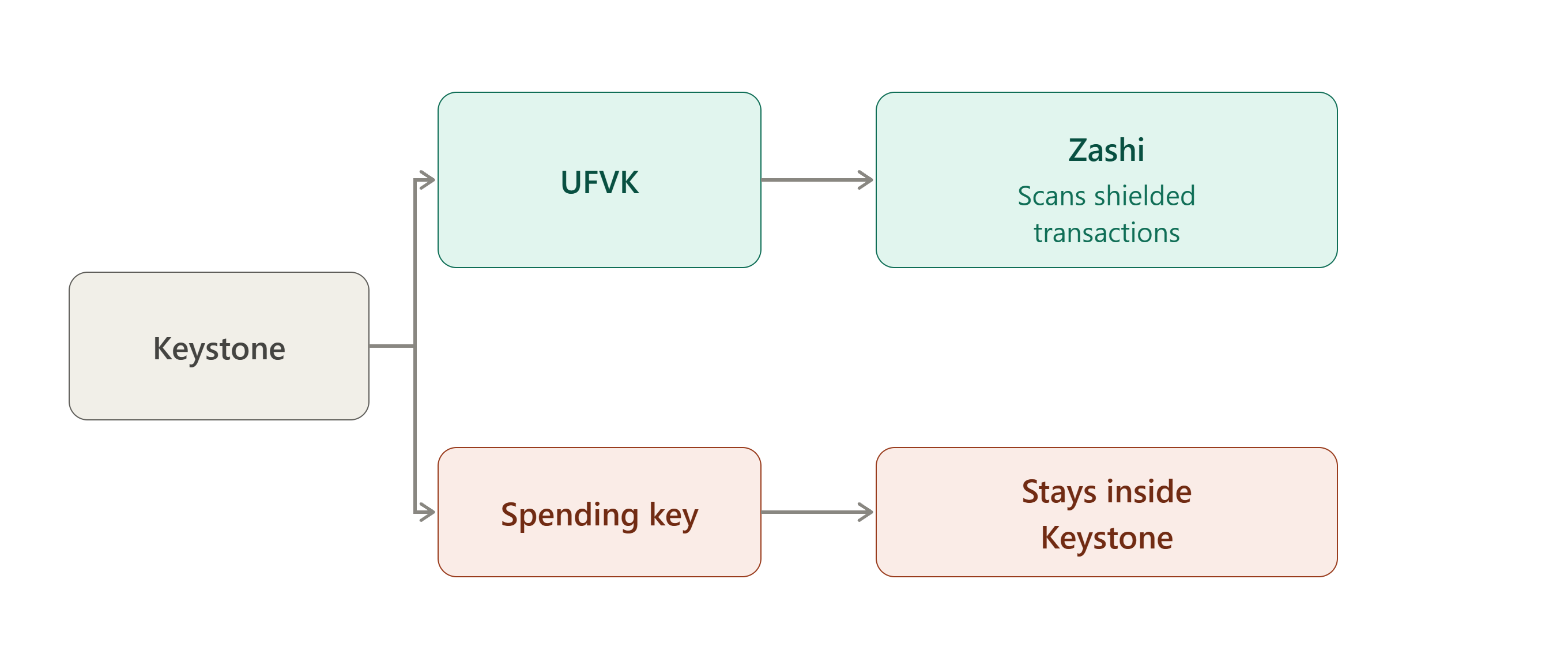
Keystone's Zcash integration with Zashi makes this separation particularly explicit. When you connect Keystone to Zashi, the Unified Full Viewing Key is transferred from Keystone to Zashi.
So the flow is:
What can Zashi do with the UFVK?
Zashi can use it to:
- identify incoming shielded transactions
- determine balances
- obtain information about shielded activity
But it cannot spend the funds simply because it has the UFVK.
The UFVK is a "viewing capability" that permits learning balances and transactions but does not permit spending.
What stays inside Keystone?
The seed/spending authority stays on Keystone. Zashi doesn't receive the seed, the spending key, or the spend authorization private key. It receives the UFVK, address information, and the information necessary for view only operation.
Together, these two halves complete the picture. What leaves the device, such as the UFVK, addresses, and watch only information, is enough for Zashi to monitor the account, but nothing that leaves the device is enough to move funds out of it.
This is why the Zashi and Keystone integration can provide shielded cold storage. The wallet application can monitor the account without possessing the authority required to spend from it. The integration was specifically launched to enable cold storage of shielded ZEC.
When you want to spend:
3. Hito
Hito follows a very similar key isolation model to Keystone, but its implementation is newer. Rather than pairing with an existing companion wallet like Zashi, Hito ships with its own Android wallet, and the onboarding process between the hardware device and that Android app is documented in Hito's development milestones.
Onboarding: what the Hito app receives
The Android wallet uses:
- the Unified Full Viewing Key (UFVK)
- Unified Address
- ZIP-32 seed fingerprint
- network information
when onboarding the hardware account.
Note that the Android application never receives the hardware wallet's seed or private spending keys.
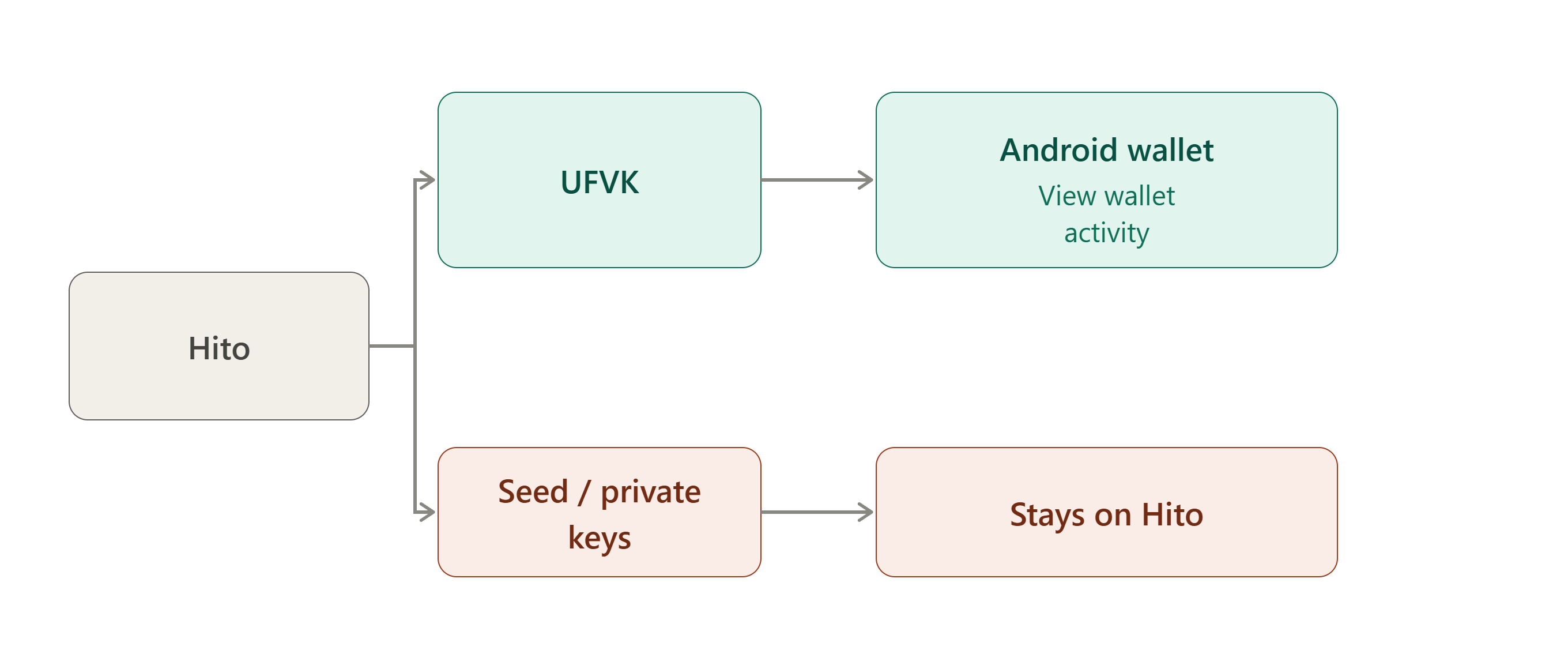
What does the Hito app get?
The documented onboarding information includes:
- UFVK
- Unified Address
- ZIP-32 seed fingerprint
- Network
The UFVK gives the Android wallet the information it needs to operate the account as a view-capable wallet without receiving the seed. The seed fingerprint is a fixed length identifier derived from the seed, used to recognize which account is which, it is not the seed itself and doesn't confer any spending ability, which is why its presence doesn't contradict the "never receives the seed" claim above.
What stays on Hito?
The actual seed, private spending keys, and signing authority remain on the hardware device. Hito then performs signing offline.
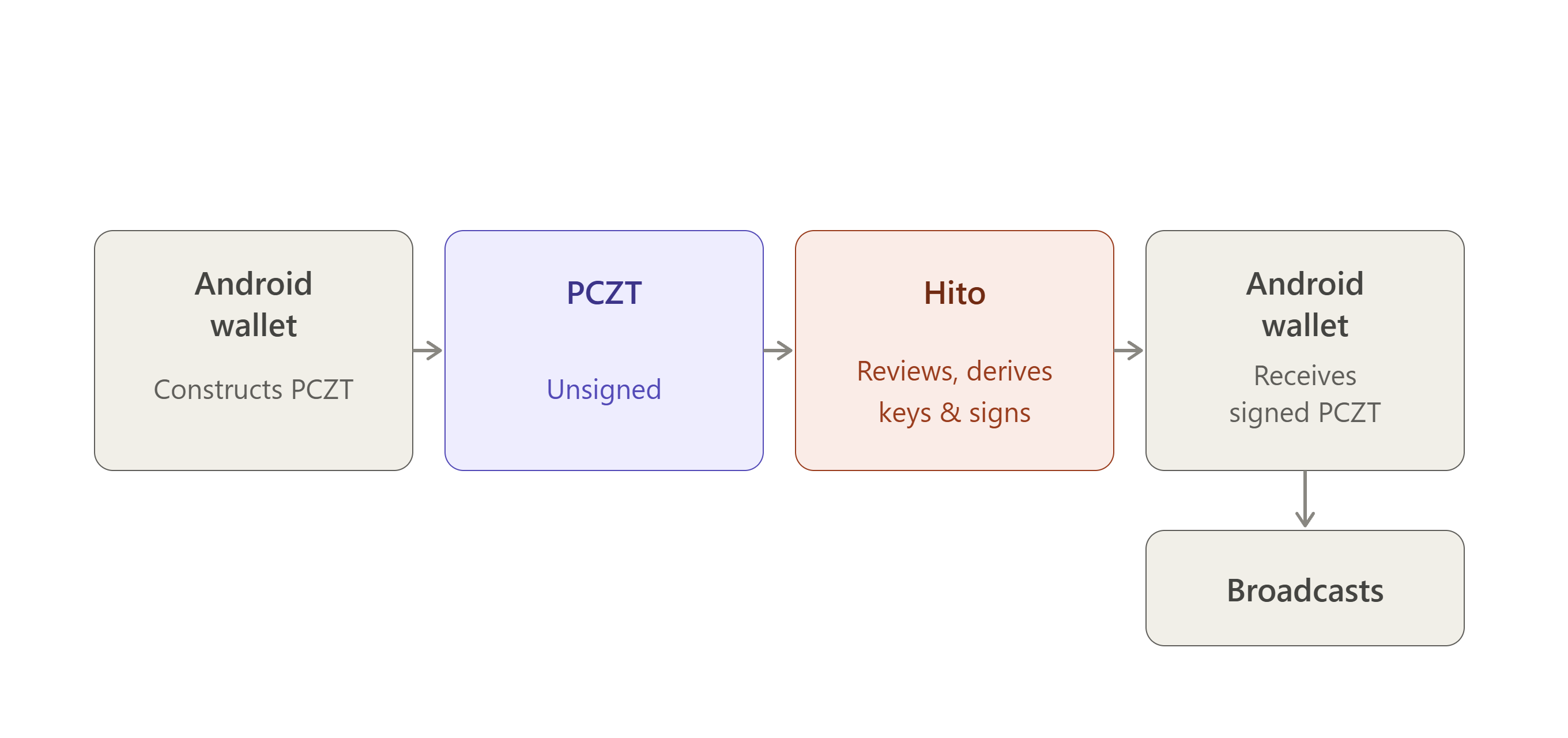
The current Hito milestone states that the entire creation, export, offline signing, and import workflow is operational, featuring BLE transport and BBQr QR export of the signed PCZT.
That workflow is worth naming explicitly, since it's the concrete instance of the complete cycle covered earlier in this report: the Android wallet creates the unsigned PCZT, exports it to Hito, Hito signs offline with its isolated key material, and the signed PCZT is imported back into the Android wallet.
At no point does the seed or spending key cross that boundary in either direction.
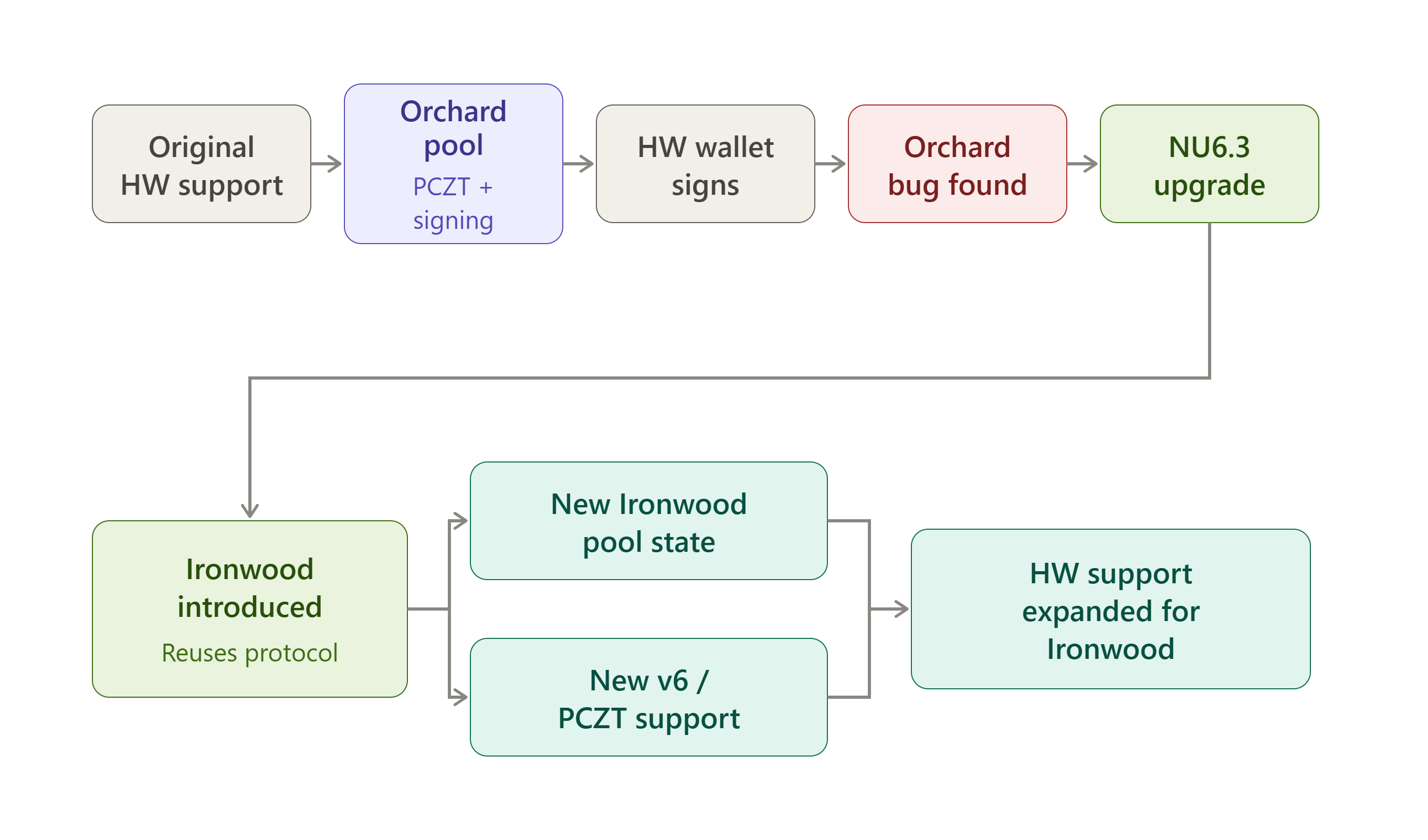
Orchard to Ironwood: The Evolution Of Hardware Wallet Support
Orchard is a shielded pool in the Zcash protocol that enables users to store and transact ZEC with enhanced privacy. Introduced in Network Upgrade 5 (NU5), Orchard uses the Halo 2 proving system and a redesigned cryptographic architecture to support shielded transactions without revealing sensitive transaction information such as the sender, recipient, or amount.
Ironwood is a shielded pool introduced in Zcash's NU6.3 network upgrade as the successor to the Orchard pool. It uses the Orchard cryptographic protocol while introducing changes designed to improve the long-term security of shielded funds, including quantum recoverability and stronger assurances about supply integrity.
At the outset, it is essential to clarify that Ironwood did not replace the Orchard protocol with an entirely new cryptographic system. Ironwood was introduced as a new shielded pool built from the existing Orchard protocol. This means they have the same Action structure, the same Halo 2 proving system, the same note and key constructions.
Ironwood has its own note commitment tree, nullifier set, anchor, and value pool, so at the consensus level it is a genuinely separate pool. But cryptographically, it's an extension of Orchard rather than a rebuild.
It was designed this way to:
- Supply integrity. On May 29, 2026, security researcher Taylor Hornby privately disclosed a critical soundness flaw in Orchard's zero knowledge proof system, one that could have allowed counterfeit ZEC to be created without leaving an on-chain trace. Because Orchard's transaction data is private, nobody can independently verify that no counterfeit ZEC was created before the fix. Sealing the old pool and starting a fresh one at zero solves that problem in a way patching Orchard in place couldn't.
- Ensure Quantum recoverability. Ironwood was designed so its funds can participate in a future recovery mechanism if the underlying discrete log assumptions are ever broken.
- Minimize implementation change. Instead of designing an entirely new shielded protocol, Orchard's proven architecture was reused. This meant far less new transaction, proving, wallet, and hardware wallet code had to be written from scratch.
The public timeline
- May 29: The Orchard vulnerability is disclosed.
- June: Orchard transactions are temporarily restricted while an initial fix ships through NU6.2. On June 12, a core developer targets July 21 for the full upgrade; it later slips a week. A community concern was raised that Keystone owners would be last to migrate, a core developer then responds that Keystone would support Ironwood from day one, with firmware targeted for July 3, pending finalized signing constants and Orchard API changes from Zcash core.
- Early July: NU6.3 reaches testnet; Zebra 6.0.0 ships July 10.
- July 27–28: Ledger's Ironwood PCZT v2 signing work merges into an integration branch. Ironwood (NU6.3) activates July 28 at block 3,428,143, sealing the original Orchard pool behind a turnstile that caps how much ZEC can leave Orchard at the amount that was legitimately deposited into it, and introduces a new transaction format.
Zebra becomes the required node, since zcashd doesn't support the new consensus rules. Addresses don't change because Ironwood reuses Orchard's receiver structure, so wallets route existing addresses into the new pool automatically. What wallets do need is migration functionality, since Orchard funds must eventually be moved into Ironwood by their owners, and new outputs that receive Orchard are now blocked by consensus entirely.
What changed technically
Transaction formats moved from version 5 to version 6, so a single transaction can carry an Ironwood component alongside existing Sapling/Orchard/transparent components. PCZT was extended in step:
- Encoding went from PCZT v1 to v2.
- A separate Ironwood bundle now sits alongside the Sapling and Orchard ones.
- v6 transactions and a new v6 sighash are supported.
- Note plaintexts gained a new version (V3).
The sighash change matters most for hardware wallets specifically. In v6, the Orchard and Ironwood anchors are excluded from the signature hash and only feed the authorizing data digest. That's a real firmware change, not just a version bump. A device has to implement the new sighash correctly and recompute it itself rather than trusting what the companion app claims it's approving.
The isolation contract itself didn't change: the device still returns only the spend authorization signature, never alpha, and never produces the binding signature, the host also still handles proving and everything else.
One signer rule did change with v6, though: dummy padding spends are signed by the IO Finalizer rather than the device, since the device has no way to verify them against real note data. The device's Signer role skips them rather than being asked to sign something it can't check. Displayed fees also now sum both the Orchard and Ironwood value balances together, since a v6 transaction can spend from either pool in the same transaction.
Getting that pool accounting right matters in practice, not just in theory. A recent bug in Brave's own Zcash wallet is a useful illustration: its fee calculation assumed all shielded inputs belonged to the legacy Orchard pool, leading to duplicated actions and incorrect fee estimates whenever a transaction actually involved Ironwood. That's exactly the class of error the "recompute it yourself, don't trust the host" principle behind hardware wallet signing exists to catch. A companion wallet got the pool accounting wrong and only a device independently checking its own math would flag that before signing off on it.
Where each signer stands
Ledger just changed the whole picture. On September 23, 2026, Ledger shipped native shielded Zcash support directly inside Ledger Wallet Desktop, no separate companion app needed anymore. Your spending key stays on the device, the computer does the transaction math, and you approve everything on screen before it's signed. It only supports Ironwood, not the old Orchard or Sapling pools. The drawback is that the legacy "Zcash Shielded" app built by Zondax, which required a companion wallet like Zkool to work, is being discontinued. Ledger is pulling that older app from availability on November 5, so anyone still using it needs to move their funds before then.
Keystone is in good shape. Firmware 3.0.2 added full Ironwood support back in July, and that's still the current, stable requirement. That version or newer is however needed to sign anything.
Hito has progressed past the initial testnet milestone. It successfully signed and submitted its first real Orchard-to-Ironwood transaction on physical hardware (initially on testnet). Subsequent updates confirmed mainnet flows (Ironwood→Ironwood, Ironwood→Transparent, and others) on production hardware. Stable firmware and broader release remain in progress.
Zondax and Zkool are currently in flux. Zondax's app is the one being retired on Ledger. Zkool, which relied on that app to talk to Ledger devices, hasn't indicated what will happen to that role once the old app disappears. It's unclear whether it stays relevant for Ledger users going forward, or whether its future is mainly with other devices.
The migration itself is the biggest ripple. Because the amount crossing pools is public, wallets spread transfers across standard denominations over time rather than moving a balance in one visible chunk which means many transactions to sign per migration, and is exactly why batch PCZT signing mattered so much for hardware wallets.
Ledger's firmware work also ran into hardware limits: a real note spend could reach tens of thousands of cryptographic syscalls in a single command, tripping the device watchdog. The fix moved field arithmetic to software and required a shared scratch state to fit within the Nano X's stack constraints.
https://forum.zcashcommunity.com/t/ironwood-is-here-updated-wallets-libraries-aug-20/56557/40
The evolution in one picture