ZecHub
Àwọn irinṣẹ Ìpamọ́
Àwọn ojútùú ìpamọ́ tó wúlò

ZecHub
Àwọn irinṣẹ Ìpamọ́
Àwọn ojútùú ìpamọ́ tó wúlò
Data security and privacy are critical concerns for individuals and businesses alike. Cyberattacks and data breaches are becoming more and more common, and it is essential to take proactive steps to protect sensitive data and maintain your privacy. One such measure is using hardware security keys, which provide an extra layer of protection to protect your devices and data.
A hardware security key is a physical device used for two-factor authentication (2FA) to protect your accounts and devices. It works in conjunction with your username and password to ensure that only authorized users can access your accounts and data.
Àwọn kókó wọ̀nyí ni wọ́n ṣe láti ṣiṣẹ́ pẹ̀lú orúkọ aṣàmúlò àti ọ̀rọ̀-ìfipamọ́ rẹ láti rí i dájú pé àwọn oníṣẹ́ tí ó wà lábẹ́ àṣẹ nìkan ló lè wọlé sí àwọn àkọọ́lẹ̀ àti ìwífún rẹ.

O gbọdọ jẹ ki 2FA nipasẹ awọn bọtini aabo hardware lori oju opo wẹẹbu tabi pẹpẹ ti o ṣe atilẹyin imọ-ẹrọ yii, fun apẹẹrẹ awọn paṣipaarọ Binance ati Coinbase.
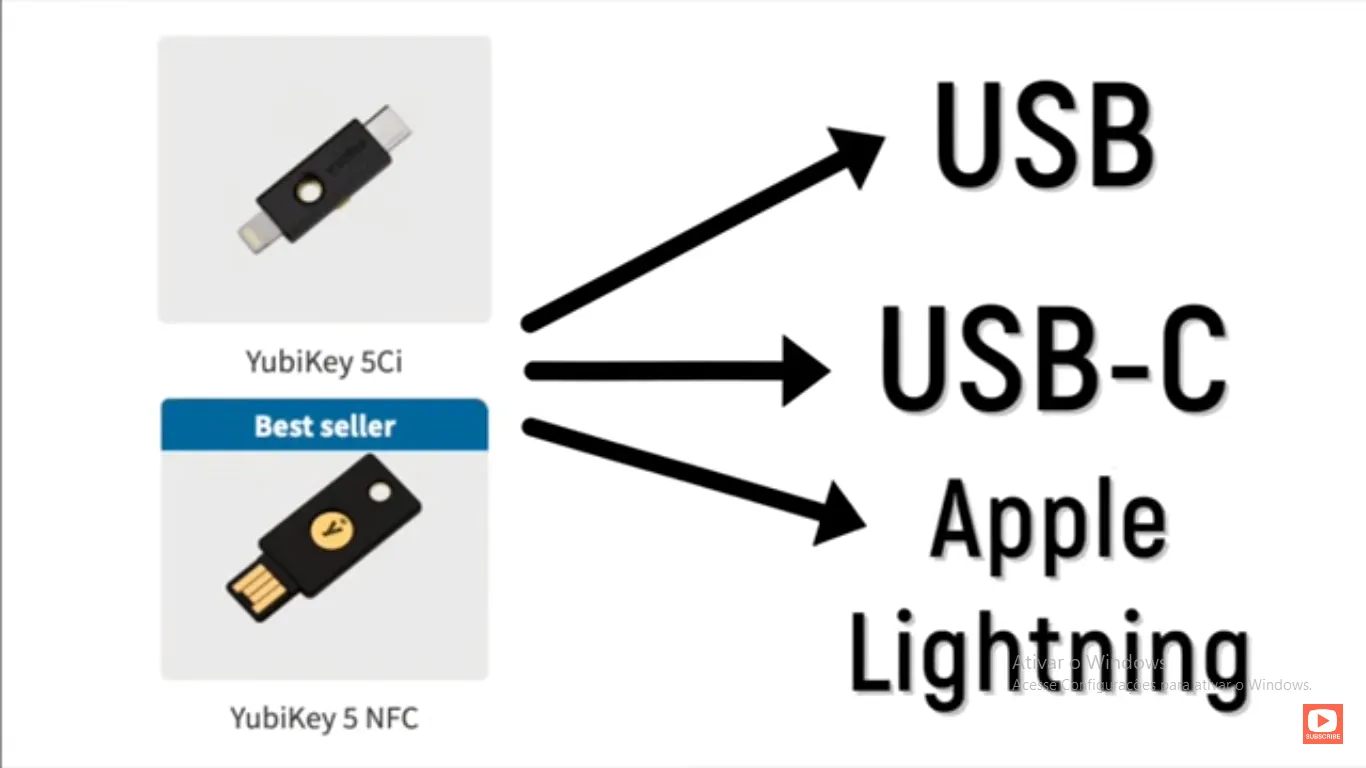
Pẹlu awọn bọtini aabo ohun elo bi YubiKey, o kan fi bọtini ohun elo sinu USB tabi ibudo Iru-C lori tabili / kọǹpútà alágbèéká rẹ tabi foonuiyara, ati pe bọtini naa pari idanimọ fun ọ.
Hardware security keys offer several advantages over traditional password-based authentication methods. They are much more difficult to attack than passwords, which can easily be compromised through brute force, social engineering or phishing attacks. Security keys generate a unique code each time they are used, making it nearly impossible for attackers to predict or replicate the code. They are also easy to use and configure and do not require any additional software or drivers to be installed on your device.
Rárá o, àwọn kọ́kọ́rọ́ tó ń dáàbò bo ohun èlò orí kọ̀ǹpútà wà ní oríṣiríṣi ọ̀nà, ó sì lè máà bá gbogbo ẹ̀rọ àti ètò ìṣiṣẹ́ mu.
Bẹ́ẹ̀ ni, kókó ààbò ohun èlò kan ṣoṣo ni a lè lò láti dáàbò bo àwọn àkọọ́lẹ̀ bíi mélòó kan lórí àwọn ìkànnì àti àwọn iṣẹ́ ọ̀tọ̀ọ̀tọ̣.
If you lose your hardware security key, you risk having your accounts blocked. It is recommended to have a backup key or alternative authentication method to avoid this scenario.
Eyi ni diẹ ninu awọn apẹẹrẹ ti 2FA Hardware ti o wa ni ọja.
Yubico YubiKey 5 NFC
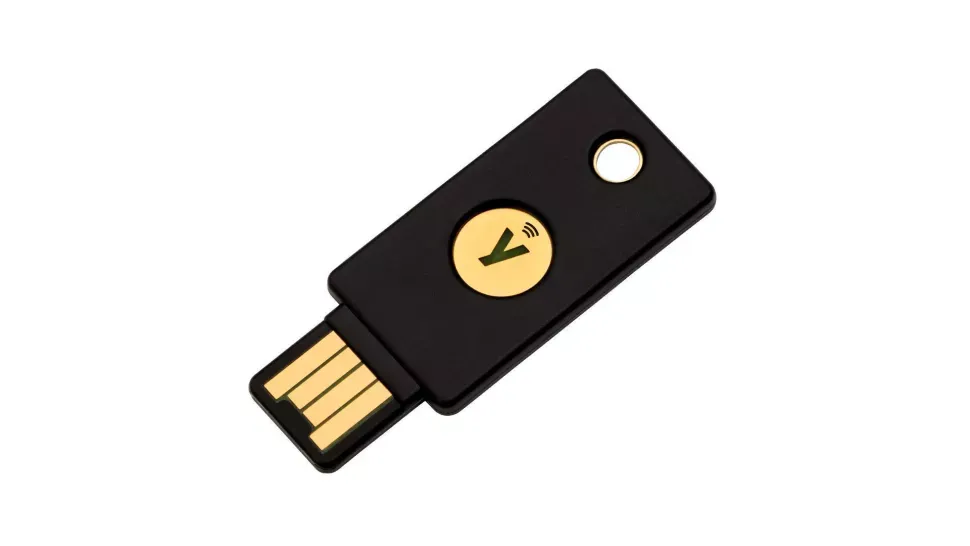
Ṣelọpọ nipasẹ Yubico, co-developer ti FIDO U2F ṣiṣi idanimọ boṣewa ti a lo nipasẹ ọpọlọpọ awọn bọtini aabo, YubiKey 5 NFC wa ni ọwọ ailewu lati daabobo awọn ẹrọ rẹ. Bi orukọ rẹ ṣe daba, o ṣiṣẹ nipa lilo USB A (tabi USB C nipa lilo ohun itanna) tabi NFC. O nfunni ni ibamu pẹlu ọpọlọpọ awọn iṣẹ pẹlu Google Chrome, Facebook, Dropbox, LastPass, 1Password ati diẹ sii. YubiKey 5 jẹ iwapọ, ti o lagbara ati irorun - ati pe o jẹ omi-omi. You can configure the YubiKey as a second U2F factor without any problems by following the service instructions and inserting the key into the USB slot when prompted. Tapping or pressing the gold circle on the key will register your key, so the next time you log in, just enter the password, insert the key, and tap it.
Thetis Fido U2F Àkọlé Ààbò
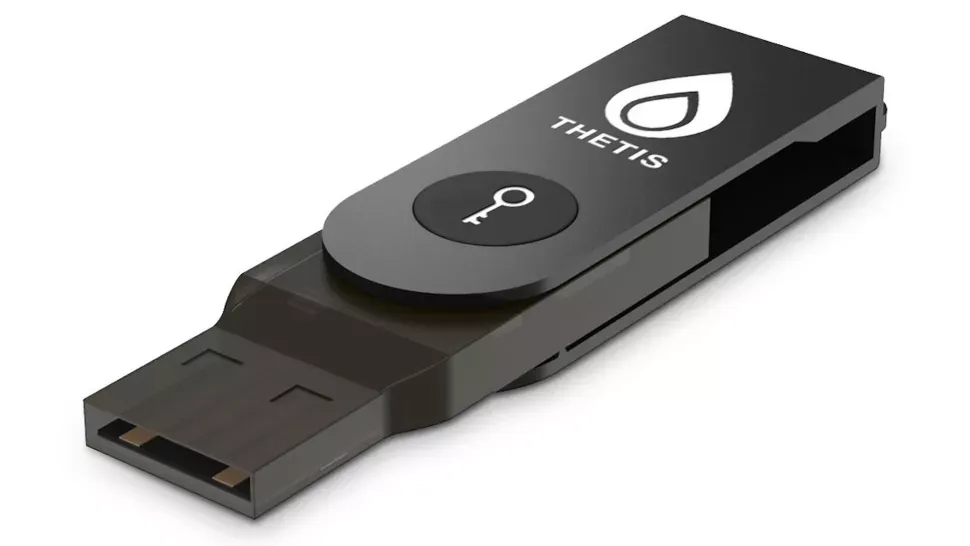
If you are looking for the best bang-for-buck in a security key, this model from Thetis should be on your list. There is no Bluetooth onboard (it is available on a more expensive model), and it only supports the FIDO U2F standard so there is no UAF or OTP compatibility. However, it will provide secure website access if you use Chrome or Opera as a browser on Windows, macOS, or Linux.
Ọ̀nà tó rọrùn láti lò ni pé, kọ́kọ́rọ́ aláàbò yìí kò wọ́n, ó sì ṣeé ká, ó ní àpò onírin tí ń yí padà, èyí tí kì í jẹ́ kí ìsopọ̣ náà lè bà jẹ́ nígbà tí wọ́ n gbé e lọ.
Àpótí oníke náà kò tóbi tó, nítorí náà o ò ní lè fi okùn abẹ́nú tàbí okùn tí wọ́n fi ń so kókó mọ́ ọn.
CryptoTrust OnlyKey
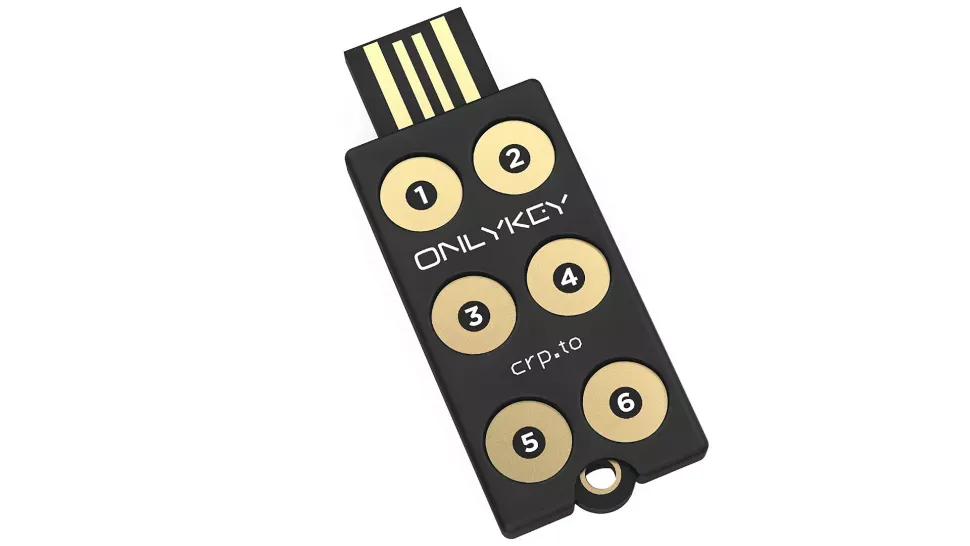
As its name suggests, OnlyKey has some nifty features its rivals lack. Thanks to an onboard keypad that can bypass keyloggers that find their way onto computers, it can keep online accounts safe if a computer or website is compromised. It supports multiple methods of 2FA, including FIDO 2 U2F, Yubico OTP, and TOTP.
Bó tilẹ̀ jẹ́ pé kì í ṣe olùṣakoso ọ̀rọ̀-ìfiwọlé tó dára jùlọ fún àwọn ìdí pàtàkì, OnlyKey lè tọ́jú 24 àkọọ́lẹ̀ OTP, 24 òǹkọ̀láà, àti 24 orúkọ oníṣe/URLs, lórí kókó kan ṣoṣo. Àṣejèrè yìí wúlò gan-an bí o kò bá fẹ́ kí o máa rántí ọ̀pọ̀lọpọ̀ òǹkàláàdì, tí o sì fẹ kí kókó náà ṣe àbójútó rẹ.
It offers features such as encrypted backup, self-destruct (which wipes the device after a certain number of incorrect attempts), and the ability to update the firmware to access new features. On the downside, its user interface is far from ideal.
Ní báyìí tí o ti mọ ohun tí 2FA Hardware keys jẹ́ àti bí wọ́n ṣe ń ṣiṣẹ́, èyí ni bí o ṣe lè so kókó rẹ mọ́ àkọọ́lẹ̀ Google rẹ.
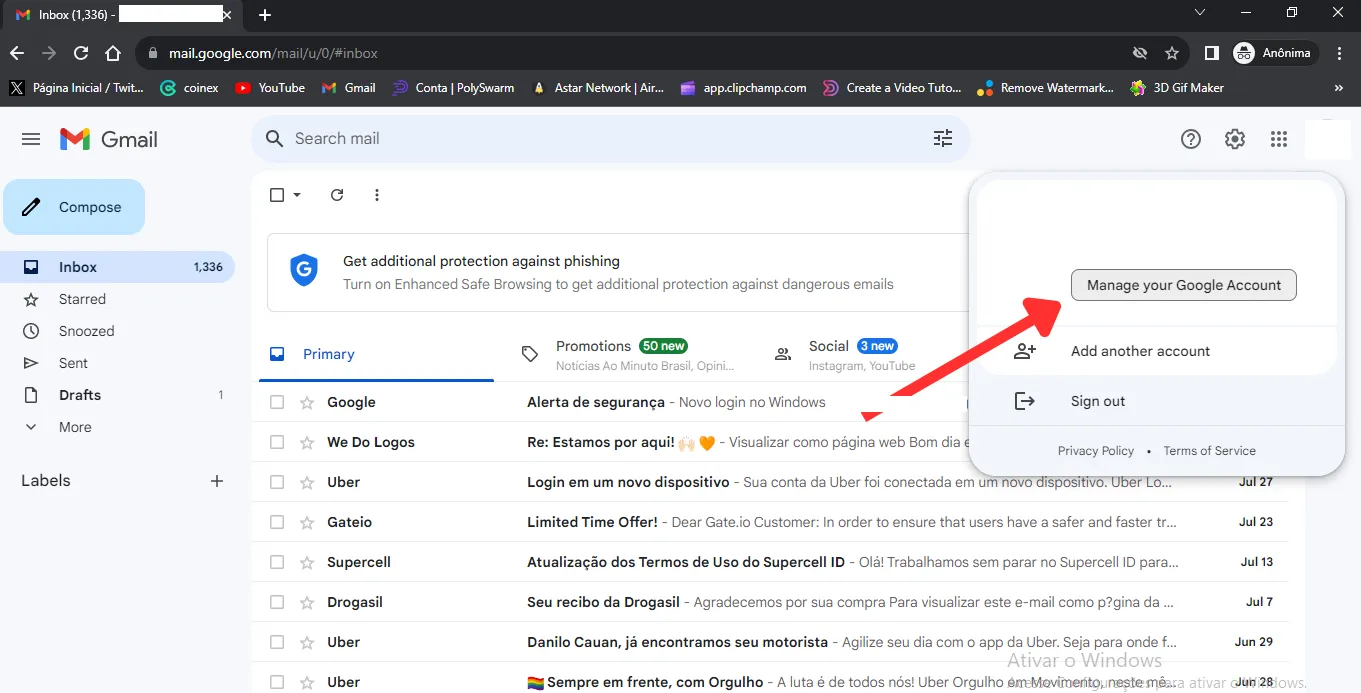
Ìgbésè 1 Wọlé sínú àkọọ́lẹ̀ Gmail rẹ kí o sì tẹ Ṣakoso Àkọọ́ṣe Google Rẹ
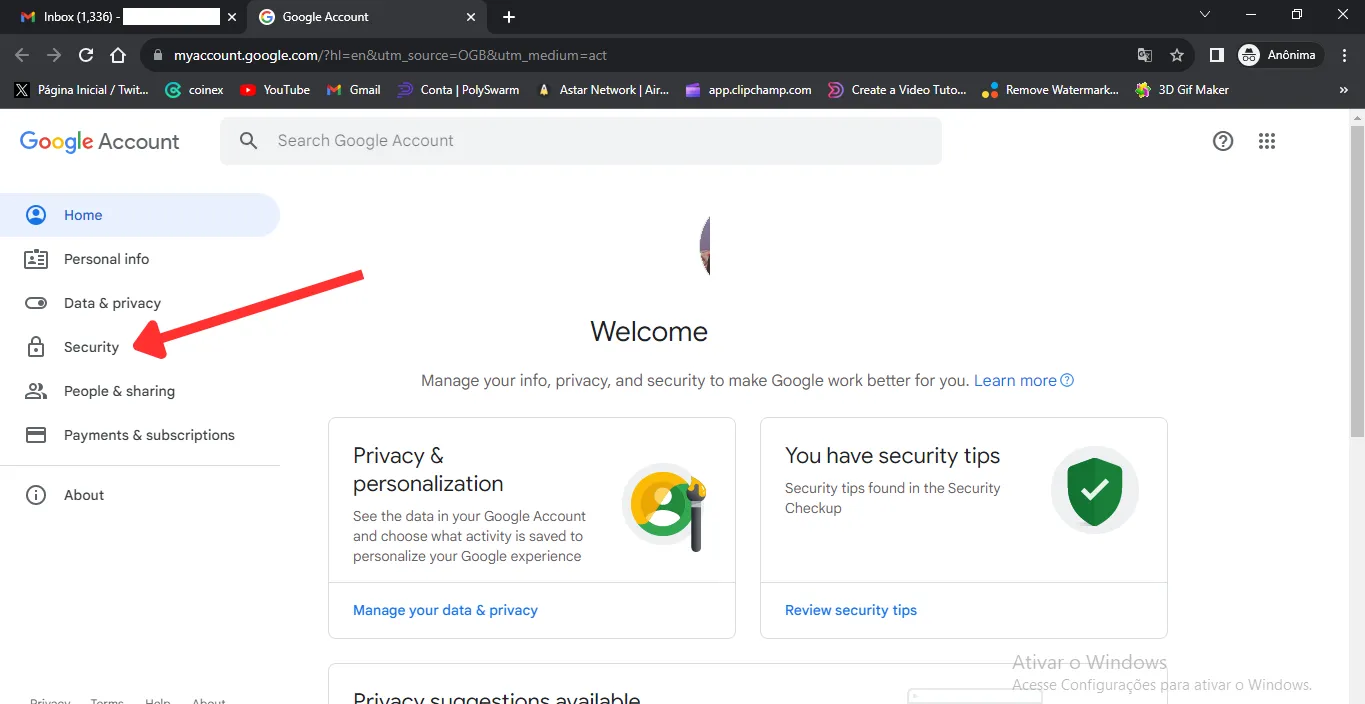
Ìgbésè 2 Tẹ lori ** Ààbò**
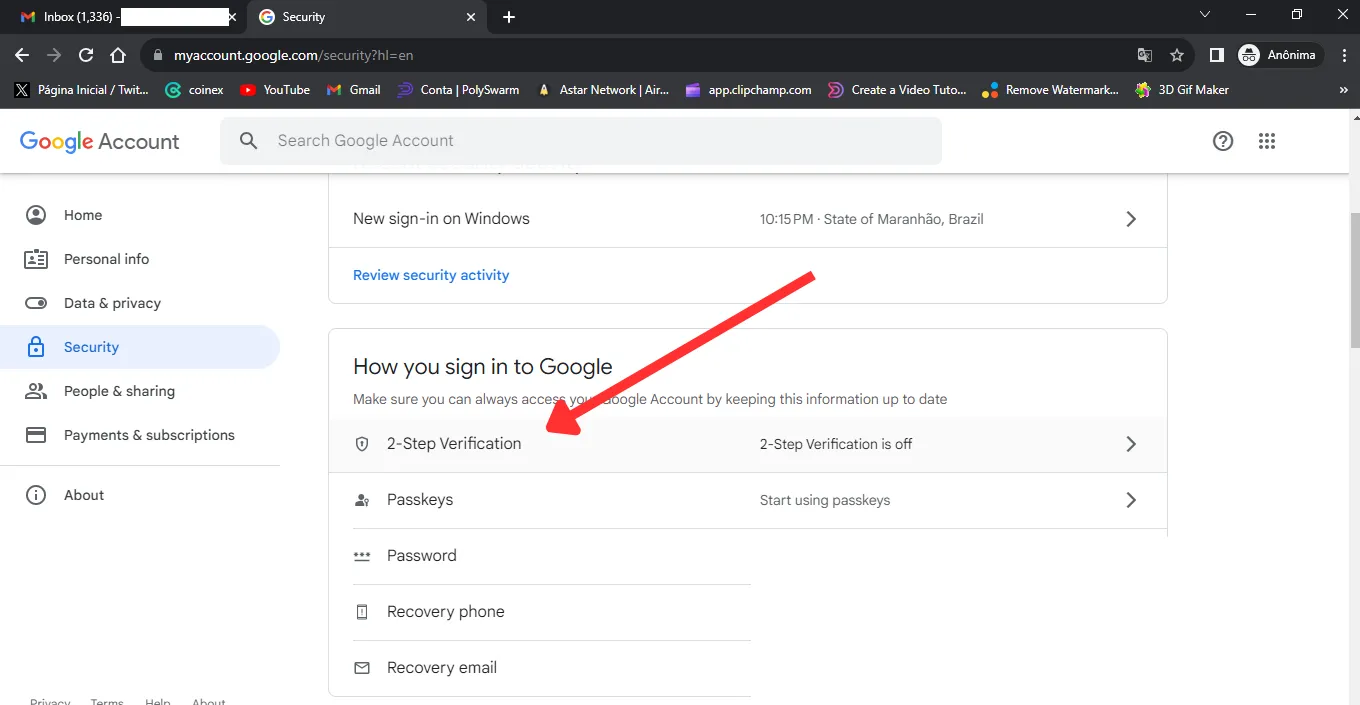
Ìgbésè 3 Tẹ lori Ṣíṣayẹwo Ìgbésẹ̀ Méjì
Ìgbésẹ̀ Kẹrin Yan Fihan Awọn Aṣayan diẹ sii
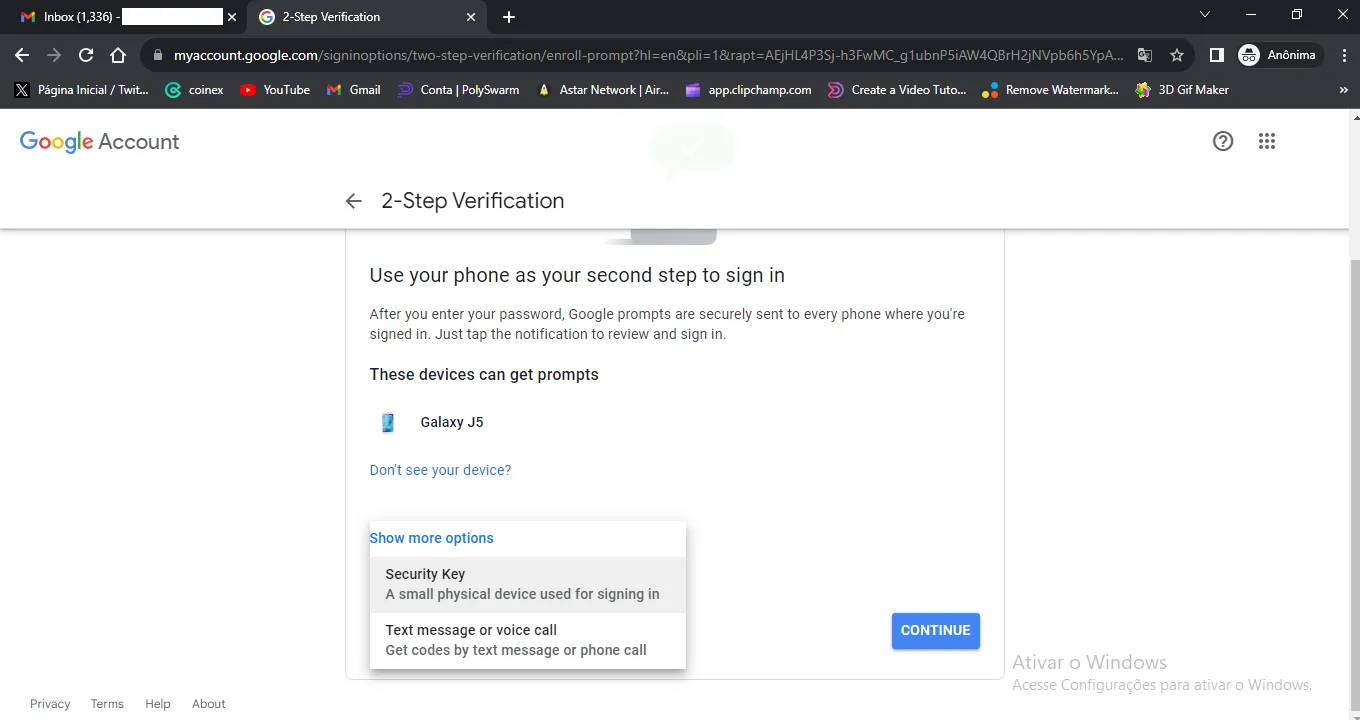
Ìgbésè 5 Nisisiyi yan ** Key Security ** ki o si tẹ lori ** Advance **
Ìgbésè 6 So kókó ààbò 2FA rẹ pọ̀
Ìgbésè 7 Kọ orukọ ti o fẹ fun ẹrọ ki o si tẹ ** Ṣẹda **