 Pay for AI Services Privately with Shielded ZEC
Beginner - 10 min
TL;DR
- NanoGPT takes shielded ZEC directly, with no account and no email
- Minimum top-up is $0.10, so you can test it for pocket change
- Credit lands in about 30 seconds, on the first confirmation
- For services that do not take ZEC, use CrossPay to spend shielded ZEC and have them paid in USDC
- What ends up on chain depends on which pool your ZEC is in, and the screen never tells you
 Who is this for?
- Anyone who does not want an AI subscription tied to their name
- Developers paying for inference without a corporate card
- People in countries where card payments to AI services fail
- Anyone who would rather not hand over an email to try a model
 The Problem
Paying for AI normally means a card, an email, and an account. That ties every prompt you write to your legal identity, and the payment processor sees it too.
Crypto is supposed to fix this, but most guides are out of date. Services change what they accept, and a walkthrough written a year ago will send you down a route that no longer works.
 Why Zcash?
A shielded payment hides the sender, the receiver and the amount. The service gets paid, and nobody watching the chain learns who paid or how much.
That only holds if you pay from shielded funds. This page is specific about when it holds and when it does not.
 What You Need
- ZEC in a shielded balance
- A wallet that can send to a unified address. This walkthrough uses Noir Wallet, a browser extension, so the whole flow stays in one window. Zkool and Zodl work the same way
- About $1 to follow along
Coming from an exchange? Most exchanges, including Binance, only withdraw ZEC to transparent addresses, and they will not accept a u1... address as a destination. Withdraw to your own transparent address first, shield it in your wallet, then pay from the shielded balance.
 Route 1: Pay NanoGPT directly
NanoGPT gives you 200+ models, including GPT, Claude, Gemini and image models, and it accepts ZEC natively.
Step 1: Open it. There is no signup
Go to nano-gpt.com and start using it. Every session is anonymous by default and the app says so itself: "You are already using NanoGPT privately." There is no account to create and no email to hand over.
Step 2: Save a sign-in token first
Before you put money in, open Settings and create a sign-in token, then store it somewhere safe.
This step protects your money. An anonymous balance lives in your browser's local data. Clear your cookies without a saved token and the balance is gone, with no account to recover it from. Do this before you deposit, not after.
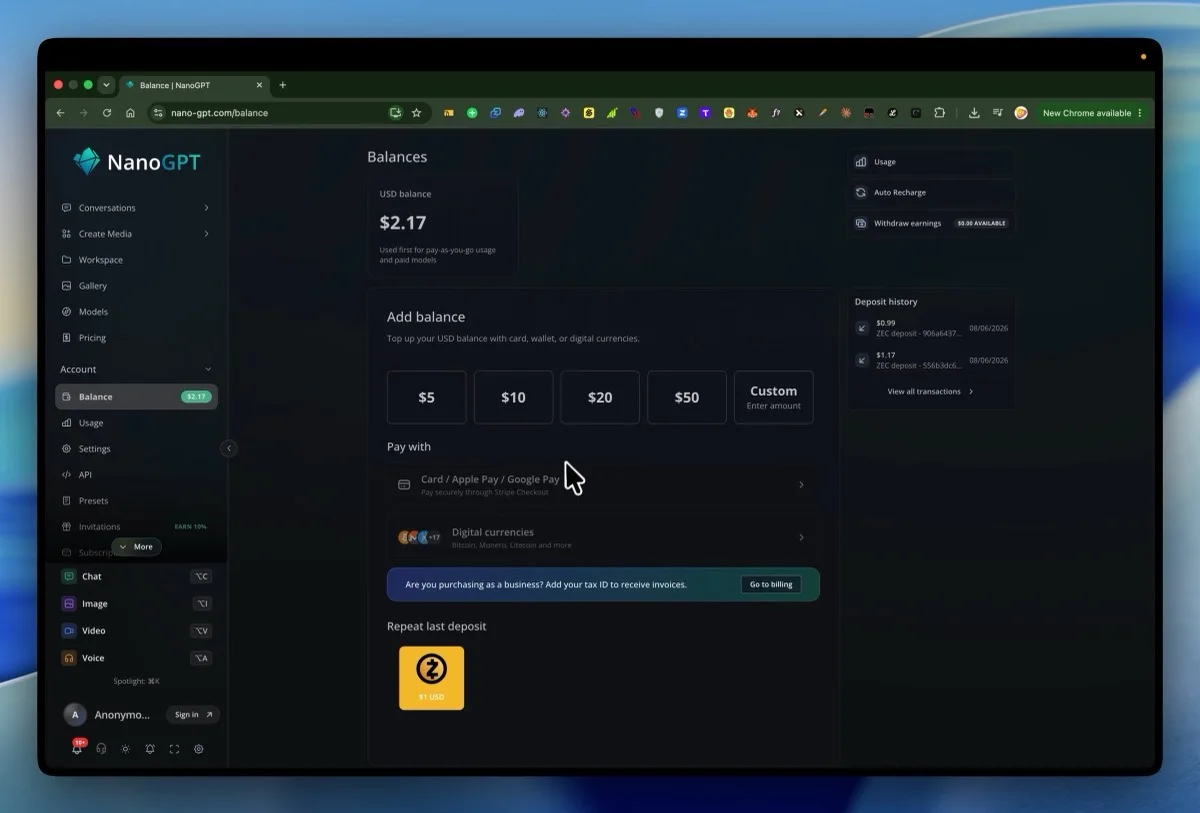
Step 3: Add balance
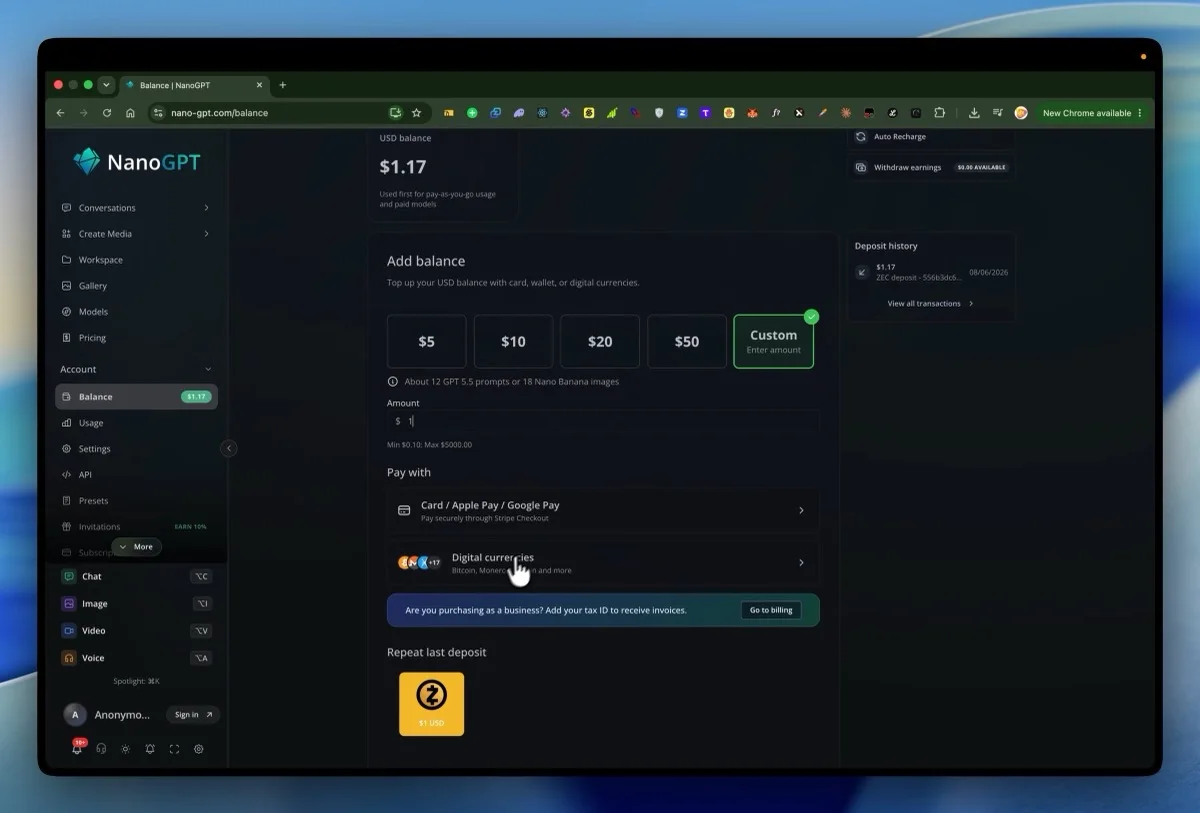
Open Balance, choose Custom, and enter an amount. The minimum is $0.10 and the maximum is $5,000. NanoGPT tells you what it buys, around 12 GPT 5.5 prompts or 18 images for $1.
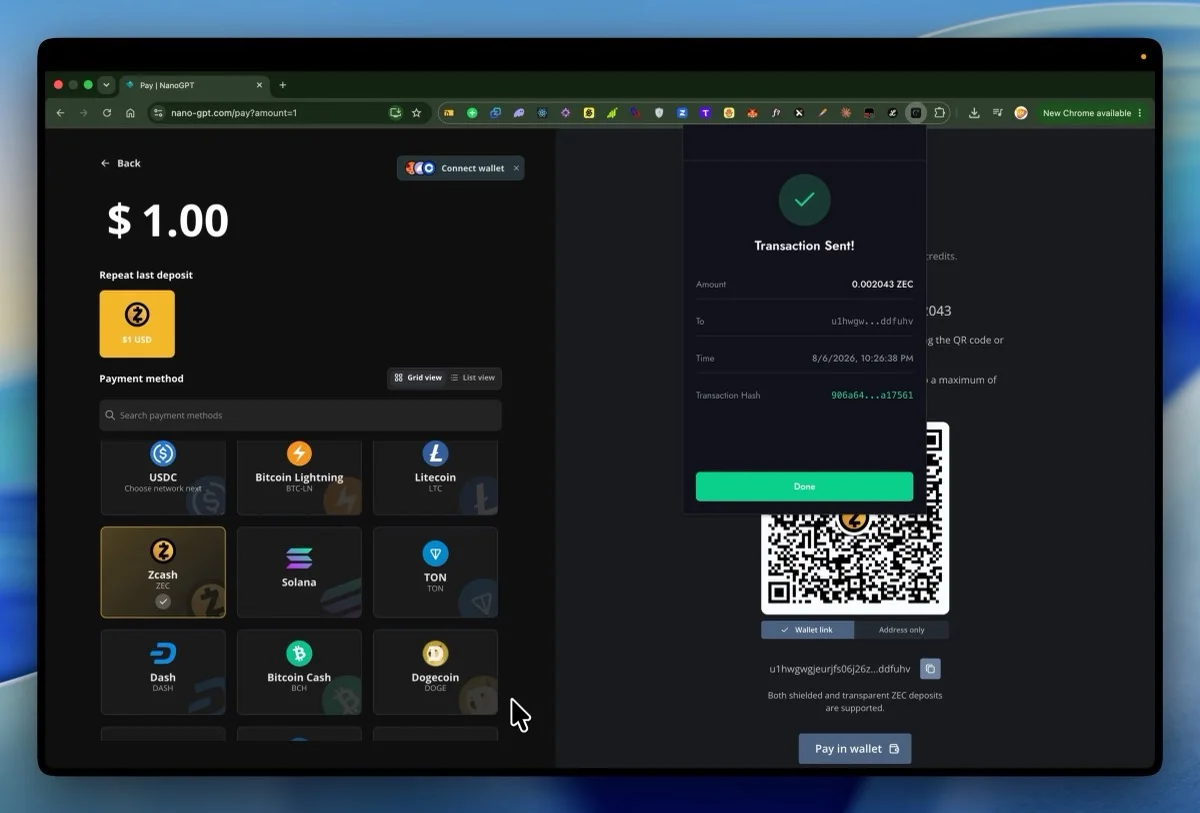
Step 4: Choose Zcash
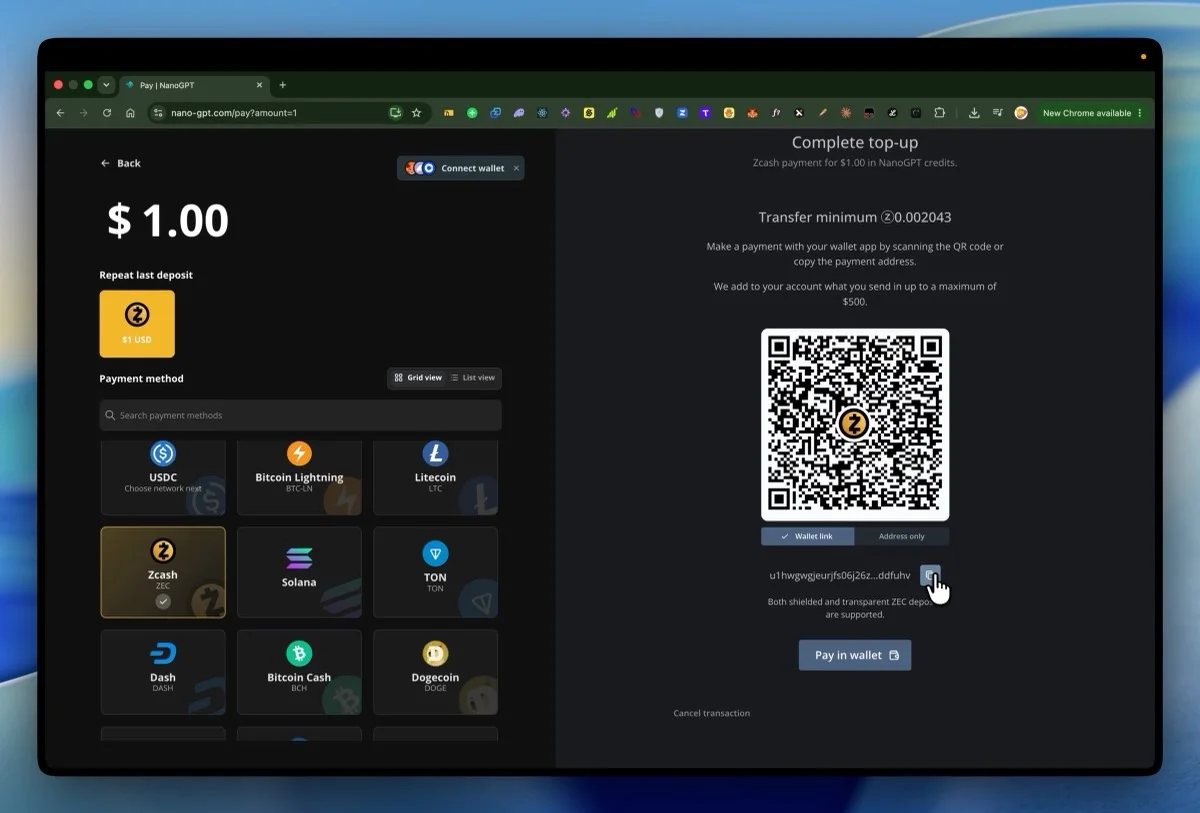
Pick Digital currencies, then Zcash from the grid.
You will get a QR code, a payment address, and a transfer minimum in ZEC for the amount you chose. That figure is priced at the moment the page loads.
Step 5: Send from your wallet
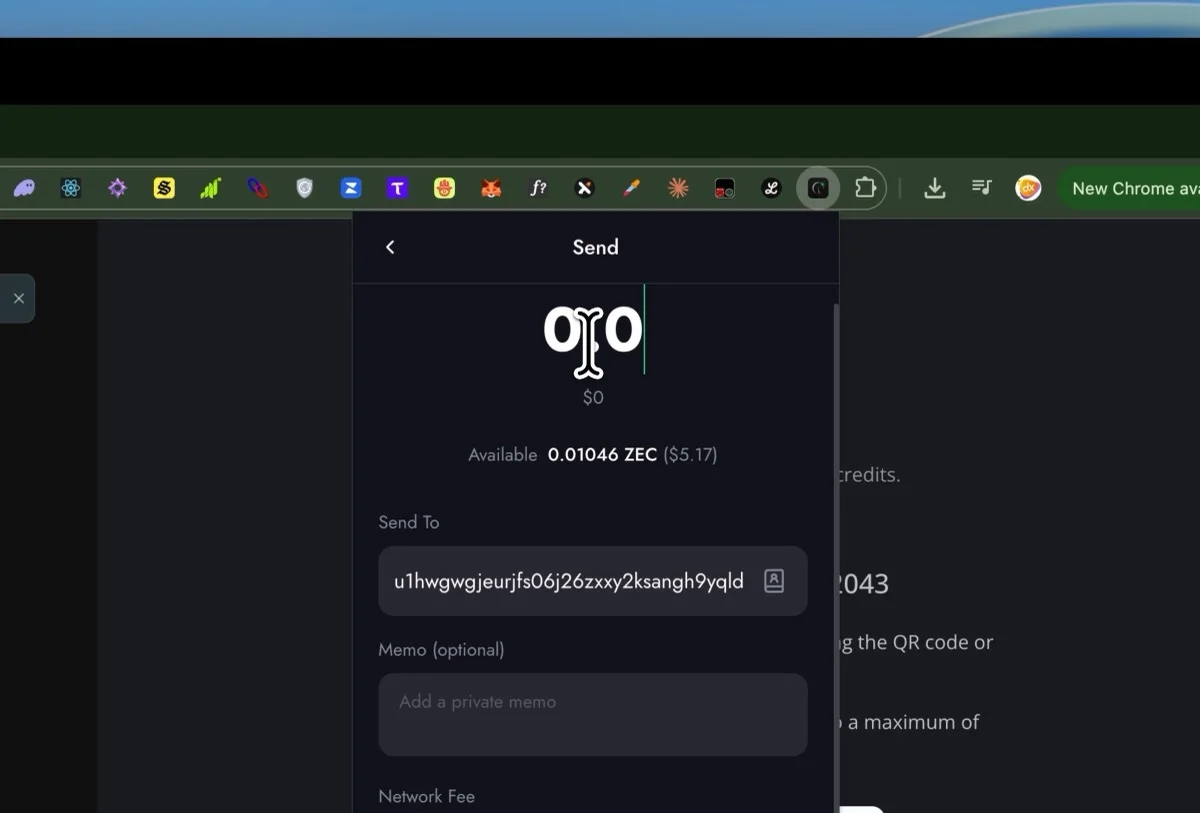
Copy the address into your wallet, enter the amount, and send. The network fee is about 0.00015 ZEC.
Send slightly over the minimum. The quote is priced when the page loads and ZEC moves before your transaction confirms. Sending exactly the minimum landed $0.99 instead of $1.00 in testing. Sending a little over landed $1.17 for the same nominal $1, because NanoGPT credits what you actually send.
Step 6: Wait about 30 seconds
Your wallet will show the transaction pending, then confirming. NanoGPT credits the balance on the first confirmation, so you do not have to wait for all three.
The balance appears and you can spend it immediately.
 Route 2: Services that do not take ZEC
Most AI services do not accept ZEC. Venice.ai and OpenRouter both take USDC instead, and OpenRouter lets you pick which chain the checkout settles on.
For those, use CrossPay in Zodl. You spend shielded ZEC and the recipient is paid in the asset they asked for, routed through NEAR Intents without a centralised exchange and without KYC.
- Get the service's payment address and the asset and chain it expects, for example USDC on Base
- Open Zodl and choose CrossPay
- Enter that address, pick the asset the service wants, and enter the amount
- Send from your shielded balance
Your ZEC leaves shielded. The service sees an ordinary USDC payment arriving and never learns it started as ZEC.
The swap leg is visible on the destination chain, so the USDC payment itself is as public as any other USDC payment. What stays private is the Zcash side and the link between the two.
 What is revealed at each step
This is the part most guides skip.
| What happens | What the service learns | What goes on chain |
|---|
| Browsing and prompting | Nothing. No account, no email | Nothing |
| A deposit address is issued | Nothing | Nothing |
| You pay from Sapling | The deposit address you used | Nothing. Shielded to shielded |
| You pay from Ironwood | Same | The amount and the block height |
| You pay from a transparent address | Same | The amount and your t-address |
| Any of the above | Your IP, unless you use Tor or a VPN | Not applicable |
Why the pool matters
NanoGPT's deposit address is a unified address. Decoding one issued in August 2026 shows exactly two receivers: Sapling and Orchard.
Since the Ironwood upgrade activated on 28 July 2026, Orchard is spend-only and no new value can enter it. That leaves Sapling as the only receiver a payment can actually land in.
So if your ZEC is already in Sapling, the payment is Sapling to Sapling and nothing about it is public. But if you have migrated to Ironwood, paying moves value across a pool boundary, and the turnstile publishes the amount and the height even though sender and receiver stay hidden.
The screens look identical either way. Keeping a small Sapling balance for payments is the simplest fix.
 Common Mistakes to Avoid
- Depositing before saving a sign-in token, then clearing cookies
- Sending exactly the transfer minimum and landing a cent short
- Trying to withdraw straight from an exchange to a
u1... address
- Assuming the payment is private without checking which pool you spent from
- Paying over a normal connection when the whole point was not being identified
 Result
You can:
- Use frontier AI models without an account, an email or a card
- Pay in shielded ZEC and know exactly what that does and does not hide
- Reach services that have never heard of Zcash, through CrossPay
- Ironwood - why the pool your funds sit in changed
- The Turnstile - what becomes public when value crosses pools
- Wallets - which wallets are maintained
- ZODL - the wallet behind CrossPay
 Progress
Step 1 of 1
You have paid for an AI service with shielded ZEC and you know what it revealed.
Next Step

 Related