



IPFS (InterPlanetary File System) bụ protocol na netwọkụ peer-to-peer e mere iji mepụta usoro enweghị isi nke ịchekwa na ịkekọrịta faịlụ.
N'adịghị ka usoro ndị ahịa-server nke ịntanetị, IPFS na-enye ndị ọrụ ohere ịkekọrịta faịlụ ozugbo na ibe ha, kama ịdabere na sava dị n'etiti iji chekwaa ma kesaa ọdịnaya.
Files in IPFS are addressed using content-addressing, meaning each file is given a unique hash or CONTENT IDENTIFIER (CID) based on its content, and this hash is used to retrieve the file from the network.
When a user adds a file to IPFS, the file is broken up into small pieces called blocks, and each block is given a CID. These blocks are then stored on different nodes in the network, so that the file can be easily retrieved from multiple sources.
This ensures redundancy and fault-tolerance while also making it difficult for any one node to become a single point of failure or control.
Gụọ: Ntinye aka na IPFS
Maka ihe atụ a anyị na-ekebe weebụsaịtị dị mfe.
Nzọụkwụ 1: Ọ bụrụ na ị maghị maka imewe weebụ dee isi ọdịnaya maka ebe nrụọrụ weebụ gị gụnyere Aha, Isi Isi nke ederede, na njikọ ndị ọzọ / saịtị & ụkwụ.
Nzọụkwụ 2: Jiri a HTML template! Tinye ederede ị dere n'ụzọ kwekọrọ na ya. Nhọrọ iji mepụta .CSS stylesheet maka ebe nrụọrụ weebụ gị.
Nzọụkwụ 3: Chekwaa ndekọ gị. All .html peeji nke + ihe oyiyi ga-abụ na otu nchekwa.
Budata ma wụnye IPFS site na Official website.
Ọ bụrụ na ị na-eji Ngwaọrụ Desktọpụ ị gaghị amalite.
Iji Terminal ma ọ bụ iwu ngwa ngwa, Run command: ipfs init
Họrọ nchekwa na faịlụ weebụsaịtị gị ma gaa na nhọrọ Tinye nchekwa.
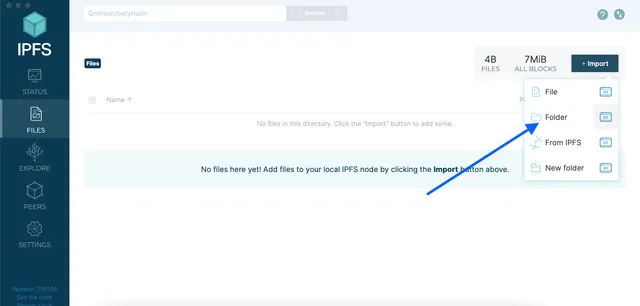
–
Ọ bụrụ na ị na-eji Terminal, Run command: ipfs add -r folder_name ịgbakwunye nchekwa niile na IPFS.
Ozugbo agbakwunyere faịlụ weebụsaịtị gị na IPFS, ịkwesịrị ** pin ** ha iji hụ na ha ka dị na netwọkụ.
–
Ọ bụrụ na ị na-eji Terminal, Run command: Ọ bụrụ n'iji Terminal, run command: ipfs pin add hash
hash = CID nke nchekwa ị gbakwunyere na nzọụkwụ gara aga.
N'aka nke ọzọ, ị nwekwara ike itinye akwụkwọ ndekọ aha site na iji ọrụ dịka Pinata ma ọ bụ Dolpin
Ọ na-azọpụta anyị oge!
–
Your website is now published on IPFS and can be accessed using the hash of the folder. To access your website, you can visit https://ipfs.io/ipfs/**hash**
hash = CID nke nchekwa ahụ.
N'okwu anyị CID = QmW2UEfap1vrRRvS5H9wed8qmsx4WsvXBk3GPGVVfWx3r3
Interplanetary Naming System (IPNS) allows you to update the IPFS CIDs associated with your website and still serve a static link. It is provided as a key.

Na menu ntọala maka nchekwa saịtị gị na ngwa desktọọpụ IPFS họrọ Bipute na IPNS.
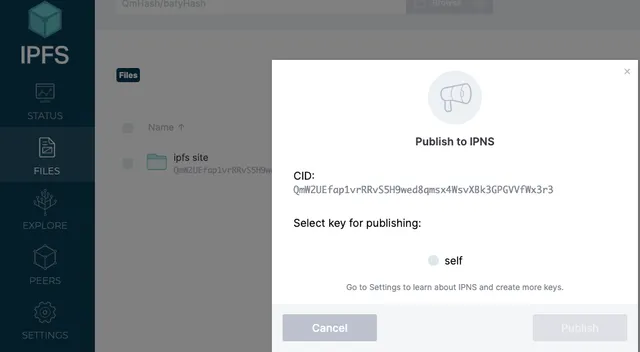
Key: k51qzi5uqu5di670a6uxywo17b2be1eyhoa2cl0qlwpfxn5p9ypcu8jbzgnj4n
Enwekwara ike iji ya lelee saịtị anyị site na ọnụ ụzọ: https://ipfs.io/ipns/k51qzi5uqu5di670a6uxywo17b2be1eyhoa2cl0qlwpfxn5p9ypcu8jbzgnj4n
E mepụtara saịtị ahụ, ugbu a anyị chọrọ ụzọ iji tụọ URL na ọdịnaya.
If you already own a web address you are able to add a new record using the TXT record _dnslink(your domain). Depending on provider it may auto populate.
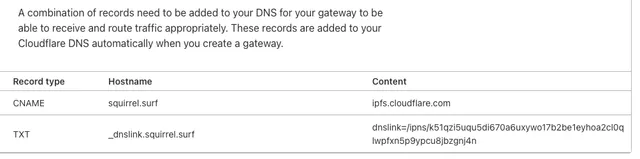
Ọ ga-ewe oge iji gbasaa site na netwọk tupu ị nwee ike ile ya anya.
Ekele! Ị nwere ebe nrụọrụ weebụ na-eguzogide ọgwụ.
** Akụnụba **